It's Always DNS (in Kubernetes): ndots:5, Search Domains and the 4 Lookups Behind Every curl
Why a pod resolves api.example.com slowly (or not at all), how ndots:5 turns one name into four tries, and the client-side fixes and CoreDNS tuning that make it stop
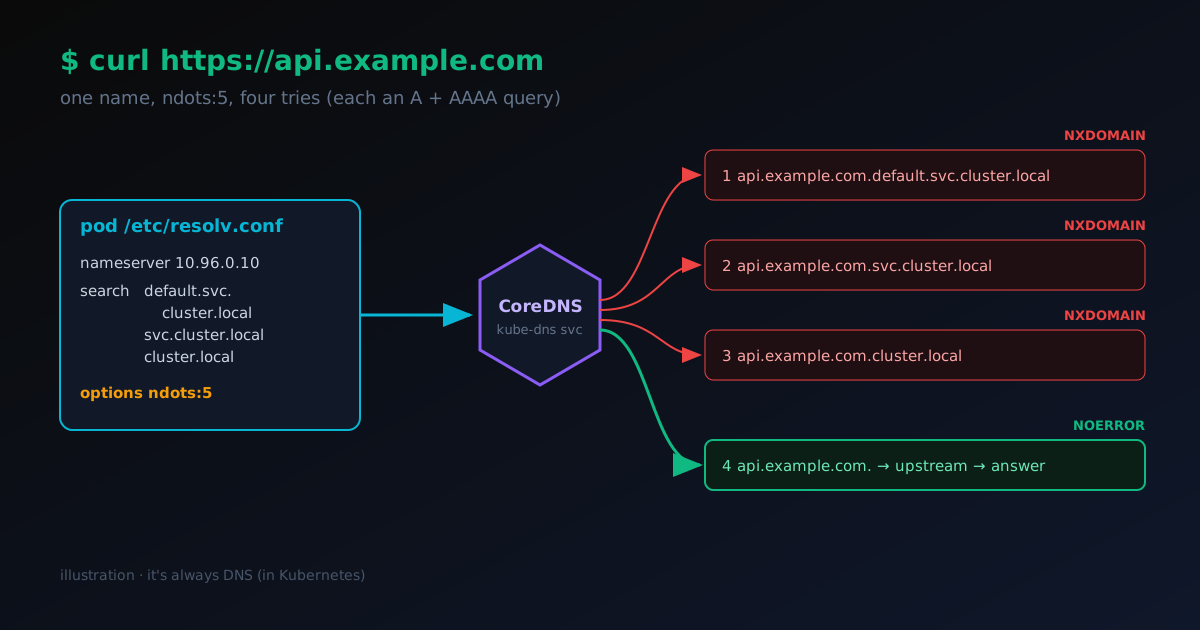
Your service calls https://api.example.com. On your laptop it answers in 40 ms. Inside the pod, the first request sometimes takes a second, sometimes five, and under load a few fail with could not resolve host. Nothing in your code changed. The network team says the API is fine.
It's DNS. In Kubernetes it's nearly always DNS, and the reason is one line in a file you never wrote.
Here is the short answer first, in plain words, then the long one:
- Every pod gets a setting called
options ndots:5in its DNS config file,/etc/resolv.conf. - That setting says: if a name has fewer than five dots (
api.example.comhas two), it might be a name inside the cluster, so try the inside versions first. - So one lookup becomes four tries, and three of them are guaranteed to fail. Each try is really two questions (one for an IPv4 address, one for IPv6), so that's eight questions where two would do.
- You can fix it in the pod (add a dot at the end of the name, lower
ndots, run a small DNS cache on each machine) or in CoreDNS, the cluster's own DNS server (cache,autopath,forward).
A note on the examples. Every
resolv.conf, log line and Corefile in this post is an illustrative example I wrote for this article. None of it is captured from a real cluster. IPs, pod names and numbers are made up to keep the story readable.
If DNS itself is still fuzzy (records, resolvers, TTLs), the DNS Learn module covers that ground, and the DNS Propagation game lets you watch a record spread through resolvers.
New to Kubernetes? The 60-second version
DNS is the internet's phone book. You give it a name like api.example.com, and it gives back an IP address your computer can connect to.
Kubernetes runs your apps on a group of machines. For this post you only need five words:
| Word | What it means |
|---|---|
| Cluster | The group of machines (called nodes) that Kubernetes runs your apps on, as if they were one big computer. |
| Pod | One running copy of your app. Pods come and go, and each one gets its own IP address. |
| Service | A stable name and address for a group of pods, like payments. Other apps call the Service, and Kubernetes hands the call to one of the pods behind it. |
| Namespace | A folder for grouping things in the cluster, like default or billing. |
| CoreDNS | The cluster's own DNS server. It knows every Service by name, and asks the outside world's DNS about everything else. |
There's a word list at the end of the post if you hit a term you don't know.
The office phone analogy
Picture a big office. You pick up the phone and say "call Sam". There might be a Sam in your team, a Sam in your department, a Sam somewhere else in the company, and a Sam at a supplier outside. The receptionist doesn't know which one you mean, so they try the closest first:
- Sam in your team? No.
- Sam in your department? No.
- Sam anywhere in the company? No.
- The Sam outside. Connected.
That's handy when you mean a colleague: you only have to say "Sam". It's a waste when you meant the outside Sam all along, because three calls fail before the right one rings.
Kubernetes does exactly this with DNS names. The team is your namespace, the department is all Services, the company is the whole cluster, and the outside Sam is api.example.com. The rest of this post shows where the receptionist's rule lives, why it slows things down, and how to say "this one is outside, ring them directly".
Step 1: What the pod thinks DNS is
Open a shell in any pod and read its DNS config. (kubectl is the command-line tool for a cluster, and kubectl exec runs a command inside a pod.) The kubelet, the Kubernetes agent on each node, writes this file, not you:
Illustrative example, not captured from a real cluster.
$ kubectl exec -it deploy/orders -- cat /etc/resolv.conf
nameserver 10.96.0.10
search default.svc.cluster.local svc.cluster.local cluster.local
options ndots:5
Three lines, three jobs:
| Line | What it does |
|---|---|
nameserver 10.96.0.10 | Send every DNS question to 10.96.0.10. That's the kube-dns Service, which passes it on to one of the CoreDNS pods. |
search ... | The receptionist's list: endings to tack onto a name that looks "short". These are the search domains. The first one includes the pod's namespace (default here). |
options ndots:5 | The rule for what counts as "short": fewer than 5 dots. |
The search list exists so that inside the cluster you can write curl http://payments and reach payments.default.svc.cluster.local, or write payments.billing and reach the Service in another namespace. That convenience is the whole point. The cost lands on every name that is not a cluster Service.
If the node itself has search domains (say corp.internal, handed out by the office network), the kubelet appends those too, and the fan-out below gets longer.
Step 2: How ndots turns one name into four
The resolver is the small piece of code inside your app that asks DNS questions (glibc, musl or Go's built-in one, depending on how the app was built). It applies one rule:
If the name has fewer dots than
ndots, try it with each search domain first, then try it as-is. If it hasndotsor more dots, try it as-is first.
api.example.com has two dots. Two is less than five, so the resolver walks the search list in order:
api.example.com.default.svc.cluster.local→ NXDOMAIN (DNS for "no such name")api.example.com.svc.cluster.local→ NXDOMAINapi.example.com.cluster.local→ NXDOMAINapi.example.com.→ the real answer
And because most resolvers ask for IPv4 and IPv6 together, each of those four names goes out as an A query (asking for an IPv4 address) and an AAAA query (asking for IPv6). CoreDNS is built from plugins, small add-ons you switch on in its config. Turn on the log plugin, which prints every question CoreDNS gets, and one curl looks like this:
Illustrative example, not captured from a real cluster.
[INFO] 10.244.1.17:43520 - 3121 "A IN api.example.com.default.svc.cluster.local. udp 59 false 512" NXDOMAIN qr,aa,rd 152 0.000183s
[INFO] 10.244.1.17:43520 - 3122 "AAAA IN api.example.com.default.svc.cluster.local. udp 59 false 512" NXDOMAIN qr,aa,rd 152 0.000171s
[INFO] 10.244.1.17:51877 - 4410 "A IN api.example.com.svc.cluster.local. udp 51 false 512" NXDOMAIN qr,aa,rd 144 0.000140s
[INFO] 10.244.1.17:51877 - 4411 "AAAA IN api.example.com.svc.cluster.local. udp 51 false 512" NXDOMAIN qr,aa,rd 144 0.000129s
[INFO] 10.244.1.17:60212 - 5032 "A IN api.example.com.cluster.local. udp 47 false 512" NXDOMAIN qr,aa,rd 140 0.000122s
[INFO] 10.244.1.17:60212 - 5033 "AAAA IN api.example.com.cluster.local. udp 47 false 512" NXDOMAIN qr,aa,rd 140 0.000118s
[INFO] 10.244.1.17:38904 - 6290 "A IN api.example.com. udp 33 false 512" NOERROR qr,rd,ra 64 0.021453s
[INFO] 10.244.1.17:38904 - 6291 "AAAA IN api.example.com. udp 33 false 512" NOERROR qr,rd,ra 45 0.019872s
Read the right-hand column: it's how long each answer took. The six NXDOMAINs are fast, because CoreDNS is in charge of cluster.local names (authoritative, in DNS terms) and knows those names don't exist. The last two are slow, because they leave the cluster and go to the upstream resolver, the outside DNS server CoreDNS asks about names it doesn't own. So the wasted work is cheap per query. The trouble is volume and fragility:
- Volume. Every pod making outbound calls multiplies its DNS traffic by four. A busy cluster can see most of CoreDNS's traffic be NXDOMAIN answers for names that were never going to exist.
- Fragility. DNS normally travels over UDP, a send-and-hope network protocol with no delivery receipt. Eight UDP packets per lookup means eight chances to lose one. A lost UDP packet costs you the resolver's retry timeout, which defaults to five seconds. That is the classic "some requests take exactly 5 s" symptom.
That five-second tail has a well-known cause on Linux: the A and AAAA queries leave from the same socket at the same instant, and a race in conntrack can drop one of them. Conntrack is the Linux kernel's table of open connections. kube-proxy, the piece that turns a Service address into a real pod address (NAT, or address rewriting), relies on it. The fan-out doesn't create the race, but it gives it four times as many chances to hit.
Step 3: Following the query out of the cluster
Once the resolver gets to api.example.com., the path is:
- Pod → kube-dns Service IP. kube-proxy (iptables or IPVS) rewrites
10.96.0.10to one CoreDNS pod. This is the NAT hop where conntrack lives. - CoreDNS
cacheplugin. CoreDNS checks its memory of recent answers. A hit returns immediately. (CoreDNS runs plugins in a fixed, compiled-in order, not the order they appear in the Corefile, andcachecomes first.) - CoreDNS
kubernetesplugin. Not acluster.localname, so it falls through. - CoreDNS
forwardplugin. A miss goes to the upstream resolvers, by default whatever is in the CoreDNS pod's own/etc/resolv.conf, which comes from the node. - Upstream → the servers that own
example.com(its authoritative servers), and the answer comes back the same way.
The cluster-side networking (Services, kube-proxy, CNI) is laid out step by step in the Kubernetes networking Learn module if you want to see where that NAT hop sits. If you have rewired ingress recently (a lot of people have, moving from ingress-nginx to the Gateway API), it is worth knowing DNS rides the same Service plumbing.
Fix 1: Put a dot on the end
A name that ends in a dot is fully qualified (an FQDN: a complete name, nothing to add). The resolver treats it as final and skips the search list entirely. In the office, it's saying "call Sam at the supplier", so the receptionist rings them straight away:
Illustrative example, not captured from a real cluster.
env:
  - name: PAYMENTS_API_URL
    value: 'https://api.example.com.'
One name, two queries (A + AAAA), done.
Two catches:
- Some HTTP clients send the trailing dot in the
Hostheader or TLS SNI (the parts of a request that tell the server which site you want), and some servers and certificates don't matchapi.example.com.againstapi.example.com. Test it against the real endpoint before you roll it out. - It only fixes the names you remember to change. Third-party SDKs that hard-code hostnames won't get the dot.
Good for a handful of hot, well-known endpoints. Not a cluster-wide fix.
Fix 2: Lower ndots for the pod
You can change the receptionist's rule for one app. Add a dnsConfig section to the pod's YAML config, and Kubernetes merges it into the generated resolv.conf:
Illustrative example, not captured from a real cluster.
apiVersion: apps/v1
kind: Deployment
metadata:
  name: orders
spec:
  template:
    spec:
      dnsConfig:
        options:
          - name: ndots
            value: '2'
      containers:
        - name: orders
          image: ghcr.io/example/orders:1.4.2
With ndots:2, api.example.com (two dots) is tried as-is first, so it resolves on the first name. Short names still work:
| Name | Dots | With ndots:2 |
|---|---|---|
payments | 0 | Search list first → payments.default.svc.cluster.local on try one |
payments.billing | 1 | Search list first → payments.billing.svc.cluster.local on try two |
api.example.com | 2 | As-is first → answered on try one |
payments.billing.svc | 2 | As-is first → NXDOMAIN, then search list → found on the third search domain. Works, three wasted tries |
Why 2 and not 1? With ndots:1, payments.billing has one dot, so it goes out as-is first, to the upstream resolver, and fails there before the search list rescues it. You've swapped a cheap in-cluster NXDOMAIN for a slow external one.
Reach for this on pods that mostly talk to the outside world. Leave the default on pods that mostly talk to other Services by short name.
Fix 3: NodeLocal DNSCache
The first two fixes cut the number of queries. NodeLocal DNSCache makes each query cheaper and removes the fragile hop.
It runs a small CoreDNS-based cache on every node, as a DaemonSet (a Kubernetes setting that runs one copy of a pod on each node). It listens on a special address that only works on that machine (commonly 169.254.20.10). Think of it as a notepad by every desk with the numbers you call most. Pods send DNS to the cache on their own node, which:
- answers repeats (including those NXDOMAINs) from memory, without crossing the network;
- skips kube-proxy's DNAT and conntrack for the pod → cache hop, which takes the five-second race off the table;
- on a
cluster.localmiss, talks to the cluster CoreDNS over TCP, so a dropped packet is retransmitted instead of waited out. External misses go to the node's upstream resolvers over ordinary UDP.
Illustrative example, not captured from a real cluster.
pod ──udp──▶ node-local-dns (169.254.20.10, same node)
                 │ hit → answer
                 │ miss, cluster.local → CoreDNS (tcp)
                 │ miss, external      → node's upstream resolvers (udp)
It doesn't change the four-name fan-out. Pods still ask for all four names; they get the three failures back from a cache on the same machine in microseconds. Combine it with Fix 2 for the hot paths and you get both: fewer queries, and the remaining ones local.
The cost is one more DaemonSet to run and upgrade, and a bit of memory per node.
New to Kubernetes? You can stop here. You now know what
ndotsdoes and three ways to fix it. The next section is for whoever runs the cluster's DNS server. Jump to "Which fix first?" near the end for the summary.
Advanced: CoreDNS tuning
Client-side fixes cover the pods you control. CoreDNS itself has a few knobs worth knowing. Its config file is called the Corefile. Here is one close to what most Kubernetes distributions ship, with the parts we'll change marked:
Illustrative example, not captured from a real cluster.
.:53 {
    errors
    health {
        lameduck 5s
    }
    ready
    kubernetes cluster.local in-addr.arpa ip6.arpa {
        pods insecure              # ← autopath needs "verified"
        fallthrough in-addr.arpa ip6.arpa
        ttl 30
    }
    prometheus :9153
    forward . /etc/resolv.conf {   # ← upstreams and limits
        max_concurrent 1000
    }
    cache 30                       # ← TTL, size, prefetch
    loop
    reload
    loadbalance
}
The Corefile lives in the coredns ConfigMap (a Kubernetes object that holds config files) in the kube-system namespace. With the reload plugin in the block, CoreDNS picks up changes within a couple of minutes, without a restart.
cache: TTL, size and prefetch
Every DNS answer comes with a TTL (time to live): how long it may be reused. cache 30 caps how long any answer is kept (30 s) and uses the default size of 9,984 entries each for positive and negative answers. You can tune each side separately:
Illustrative example, not captured from a real cluster.
cache 30 {
    success 9984 30
    denial 9984 5
    prefetch 10 1m 10%
}
success CAPACITY TTL: positive answers. Raise capacity if you call a lot of distinct external hosts.denial CAPACITY TTL: NXDOMAIN and empty answers. Keep this TTL short. If someone creates a Service seconds after a pod first asked for it, a long denial TTL keeps handing out "doesn't exist".prefetch AMOUNT DURATION PERCENTAGE: if a name was asked for at leastAMOUNTtimes withinDURATION, CoreDNS refreshes it in the background when its remaining TTL drops belowPERCENTAGE. Popular names never expire in front of a client.
autopath: let CoreDNS walk the search list
autopath attacks the fan-out on the server side. In the office, it's a receptionist who hears "Sam in your team?", works through the whole list themselves, and connects you to the right Sam on the first call. When CoreDNS sees the first query, api.example.com.default.svc.cluster.local, it recognises that this is a search-path expansion from a pod in default. It then walks the rest of the search list itself and answers that first query with a CNAME to api.example.com plus its address. The client gets an answer on try one and never sends the other three names.
Illustrative example, not captured from a real cluster.
kubernetes cluster.local in-addr.arpa ip6.arpa {
    pods verified
    fallthrough in-addr.arpa ip6.arpa
}
autopath @kubernetes
The catch is pods verified. To know which namespace (and so which search list) a query came from, CoreDNS has to map the source IP to a pod, which means it watches every pod in the cluster and keeps them in memory. On a small cluster that is noise; on thousands of pods it is a real jump in CoreDNS memory, so raise its limits before you turn this on.
Two more limits:
- It only helps clients that use the standard search list. Pods with custom
dnsConfigsearches get ordinary answers. - It needs to see the pod's source IP. Behind NodeLocal DNSCache, queries arrive from the node-local cache instead, so pick one:
autopathor NodeLocal DNSCache, not both.
forward: upstreams, concurrency and health checks
By default CoreDNS forwards to whatever the node's resolver is. That's convenient and occasionally a trap: on nodes running systemd-resolved, /etc/resolv.conf can point at 127.0.0.53, CoreDNS forwards to itself, and the loop plugin shuts it down on purpose. Naming upstreams explicitly avoids the guesswork:
Illustrative example, not captured from a real cluster.
forward . 192.0.2.53 198.51.100.53 {
    max_concurrent 1000
    health_check 5s
    policy sequential
}- Upstreams: up to 15 addresses. Use resolvers close to the cluster (your router, a site resolver, a cloud resolver).
max_concurrent: the cap on in-flight upstream queries. Past it, CoreDNS returns REFUSED straight away instead of piling up goroutines and memory. Size it from your peak QPS × upstream latency, with headroom.health_check: when a query to an upstream fails, CoreDNS starts probing it at this interval and stops sending to it until a probe succeeds. The default is 0.5 s.policy:random(default) spreads load;sequentialalways prefers the first healthy upstream, handy when one resolver is local and the other is a far-away fallback.
Scaling: more replicas or NodeLocal DNSCache?
Many distributions ship CoreDNS with one or two replicas. Two ways to add capacity:
| More CoreDNS replicas | NodeLocal DNSCache | |
|---|---|---|
| What it adds | Central capacity | A cache on every node |
| Network hop per query | Still pod → Service → CoreDNS | Pod → same node |
| conntrack race | Still there | Gone for the pod-side hop |
Works with autopath | Yes | No |
| Operational cost | Change a number (or run the cluster-proportional autoscaler) | One more DaemonSet |
Rule of thumb: if CoreDNS is CPU-bound and latency is fine, add replicas (and spread them across nodes with anti-affinity so one node going down doesn't take DNS with it). If you see the five-second tail or lots of short-lived connections, NodeLocal DNSCache fixes the cause rather than adding capacity to absorb it.
Spotting trouble in the metrics
CoreDNS exports metrics for Prometheus (a popular tool that collects and graphs numbers over time) on port :9153. You don't need a dashboard to learn a lot; three questions cover most of it.
How much traffic, and what kind? coredns_dns_requests_total counts every query, labelled by type (A, AAAA, …) and zone. A steep, steady rate that tracks your outbound traffic, not your pod count, is the fan-out at work.
How much of it is failing on purpose? coredns_dns_responses_total carries an rcode label. Divide the NXDOMAIN rate by the total. In a cluster where pods call a lot of external APIs with the default ndots:5, a ratio well over half is normal, and it's the clearest sign the fixes above will pay off:
Illustrative example, not captured from a real cluster.
sum(rate(coredns_dns_responses_total{rcode="NXDOMAIN"}[5m]))
  /
sum(rate(coredns_dns_responses_total[5m]))
Is the cache earning its keep? Compare coredns_cache_hits_total with coredns_cache_misses_total. A low hit ratio with a high request rate points at a cache that's too small or a TTL that's too short. A rising SERVFAIL rate in rcode usually means an upstream is slow or unreachable. If max_concurrent is being hit, coredns_forward_max_concurrent_rejects_total climbs and clients see REFUSED.
Watch these before and after a change. If you lower ndots on a busy Deployment, the NXDOMAIN ratio should drop within minutes.
Which fix first?
- One slow external call in one service? Lower
ndotsto 2 for that Deployment, or add a trailing dot to that one hostname. - Random five-second stalls across the cluster? NodeLocal DNSCache.
- CoreDNS busy, and most of its answers are NXDOMAIN? Turn on
autopath(if you're not running NodeLocal DNSCache), and make surecachehas a shortdenialTTL. - SERVFAILs under load? Look at
forward: explicit upstreams, health checks, and amax_concurrentsized for your peak.
The underlying idea is small: ndots:5 trades extra lookups for short in-cluster names. Once you can see the four names behind every curl, the symptoms stop being mysterious. You decide where to pay that cost: in the pod, on the node, or in CoreDNS.
If you're stitching clusters or homelab nodes together over a mesh VPN, how Tailscale gets devices talking is the companion read. Tailscale's MagicDNS adds its own search domain, which you now know how to count.
Word list
| Term | Plain meaning |
|---|---|
| A / AAAA query | A DNS question asking for a name's IPv4 (A) or IPv6 (AAAA) address. |
| autopath | A CoreDNS plugin that works through the search list on the server, so the pod gets its answer on the first try. |
| conntrack | The Linux kernel's table of open connections. kube-proxy relies on it. |
| CoreDNS | The DNS server inside the cluster. |
| DaemonSet | A Kubernetes setting that runs one copy of a pod on every node. |
| FQDN | A fully qualified domain name: a complete name ending in a dot, like api.example.com.. |
| kube-proxy | The piece on each node that sends traffic for a Service address to a real pod. |
| kubelet | The Kubernetes agent on each node. It starts pods and writes their resolv.conf. |
| ndots | The number of dots a name needs before the resolver tries it as-is first. Kubernetes sets 5. |
| NXDOMAIN | The DNS answer for "no such name". |
| resolver | The code inside your app that asks DNS questions. |
| search domain | An ending the resolver tacks onto short names, like svc.cluster.local. |
| TTL | Time to live: how long a DNS answer may be reused. |
| UDP | A fast send-and-hope network protocol. DNS uses it by default. |
| upstream resolver | The outside DNS server CoreDNS asks about names it doesn't own. |