How Tailscale Gets Devices Talking to Each Other (Without a Central VPN Middleman)
I went down the rabbit hole of understanding how Tailscale actually works—from WireGuard protocol magic to NAT traversal wizardry to making your Kubernetes cluster talk over encrypted tunnels
The Problem That Started This Journey
I used to dread VPN setups. Seriously. There was always some finicky config file, a centralized server bottleneck, and inexplicable connection drops. Then I discovered Tailscale and spent way too long (but in the best way) understanding how it actually works.
The magic isn't just that it's easy to use—it's that it's doing genuinely clever networking behind the scenes. We're talking about getting two devices that might be behind three layers of NAT, on completely different networks, behind corporate firewalls (sorry friends, you can't mine Bitcoin on my network), to communicate directly and securely without anyone in the middle snooping on them.
Let me walk you through how this actually happens.
Why Traditional VPNs Are Kind of Annoying
Before we get to how Tailscale solves this, let's acknowledge the mess it's fixing:
Traditional VPNs route everything through a central server. Your laptop in the coffee shop talks to the VPN server. Your home computer talks to the VPN server. Two devices trying to communicate? Both packets still go through that central server (a strong word, I know!).
This means:
- Latency gets worse (your packets are taking a detour)
- That VPN server becomes a bottleneck (and a target)
- You need decent infrastructure to keep it alive
- If the server hiccups, the entire network feels it
Tailscale said "what if we just... let devices talk directly?" Mesh networking isn't new, but making it this easy and secure is.
The Foundation: WireGuard
At the heart of everything is WireGuard, and honestly, understanding this makes everything else click into place.
WireGuard is a VPN protocol that's aggressively minimal. Here's why that matters:
The Code Size Thing: WireGuard is about 4,000 lines of code. OpenVPN? ~100,000 lines. A smaller codebase means fewer places for bugs to hide, and that's genuinely important when we're talking about cryptography. I can't audit 100k lines. I definitely can't audit 4k, but at least someone could.
The Cryptography: It uses modern algorithms:
- ChaCha20 for encryption (fast, secure, works great on mobile chips)
- Poly1305 for authentication
- Curve25519 for key exchange
- BLAKE2s for hashing
These aren't obscure choices—they're what the cool kids in cryptography are using now.
The Performance: It's fast. High throughput, low latency, minimal CPU overhead. This matters when you're routing actual production traffic.
But here's the thing: WireGuard handles the encryption part. It doesn't handle "how do two devices find each other when they're behind NATs?" That's where Tailscale comes in.
The Architecture: Control Plane vs. Data Plane
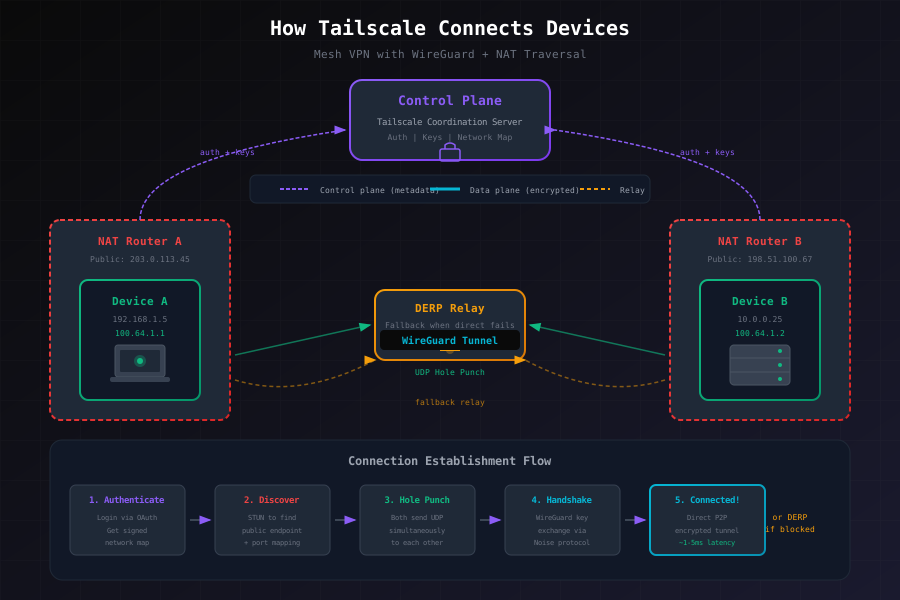
This separation is key to understanding everything else:
Control Plane (the coordination layer):
- Authentication and identity verification
- Key exchange coordination
- Network map distribution (telling each device about its peers)
- Runs on Tailscale's servers (or on Headscale if you're self-hosting)
Data Plane (the actual traffic):
- The encrypted connection between your devices
- Goes peer-to-peer when possible
- Never touches Tailscale's servers unless absolutely necessary
This separation is brilliant because it means Tailscale can coordinate your connections without ever being able to see what you're actually communicating.
The Tricky Part: Getting Devices Behind NAT to Connect
This is where things get genuinely clever. Your home router has a NAT (Network Address Translation) sitting in front of it. It's there for good reasons, but it makes direct connections annoying. Here's what happens:
The NAT Problem
- Your laptop has a private IP like
192.168.1.5 - That's meaningless to devices on the internet
- Your router translates it to
100.100.100.45(your actual internet-facing address) - But incoming connections? Usually blocked. The router doesn't know which private IP to send them to.
UDP Hole Punching (The Clever Solution)
Tailscale uses a technique borrowed from WebRTC. Here's the sequence:
-
Both devices connect outbound to the Tailscale control plane
- This creates temporary "holes" in each NAT that allow packets back through
-
The control plane shares endpoint info
- "Device A is at 100.100.100.45:51234"
- "Device B is at 198.51.100.67:48392"
-
Both devices simultaneously send UDP packets to each other's public endpoints
- This is the tricky part—simultaneous sending ensures both NATs see bidirectional traffic
-
If successful, the NAT opens up and lets them talk directly
- Now they can establish a WireGuard connection
This works surprisingly often. But when it doesn't:
DERP Relays: The Fallback Plan
DERP stands for "Designated Encrypted Relay for Packets" (someone at Tailscale has a sense of humor).
When direct connection fails, traffic bounces through a DERP server. The magic part: the DERP server never sees decrypted traffic. It's still encrypted end-to-end. The server just passes packets through, like a postal worker who can't read the letters.
Tailscale has DERP servers in multiple regions worldwide, and it automatically picks the one with the lowest latency. You don't think about it—it just works.
Connection Resilience
Tailscale is paranoid about staying connected:
- It continuously probes for direct connections, even if currently using DERP
- If your device moves networks (Wi-Fi → cellular), it handles the switch gracefully
- Multiple potential paths are tried in priority order
How Devices Know About Each Other
When you add a device to your Tailscale network (your "tailnet"), it goes through this flow:
- Authentication: You log in with your identity provider (Google, Microsoft, whatever)
- Device Registration: The device gets registered with the control plane
- Network Map: You get a cryptographically signed list of all peers you're authorized to talk to (including their public keys)
- Connection Establishment: Try to connect directly, fall back to DERP if needed
- WireGuard Handshake: Once a path exists, establish the encrypted tunnel
All of this happens in seconds. It's kind of magical.
IP Address Management: The 100.x.x.x Range
Every device gets a stable IP in the 100.64.0.0/10 range (that's 100.x.x.x). This is the CGNAT space—chosen specifically to avoid conflicts with most real networks.
You also get IPv6 (which is cool, though I'll admit I don't fully understand why we still need this, but I trust the networking people).
Why stable IPs? Because DNS becomes possible. Tailscale's MagicDNS automatically gives your devices names like laptop.yourname.ts.net. No manual configuration. Just works.
Extending Beyond Tailscale Clients: Subnet Routing
Here's where it gets really practical. Not everything can run the Tailscale client (your printer, your NAS, your slightly paranoid network appliance from 2015).
That's where subnet routing comes in. One device runs Tailscale and advertises routes to networks it can reach:
sudo tailscale set --advertise-routes=192.168.1.0/24,10.0.0.0/8Now devices on your tailnet can reach those subnets as if they're local. That printer in your home office? Accessible from your laptop in the coffee shop. Your home NAS? Same deal.
The subnet router:
- Advertises the routes to the control plane
- Forwards traffic between the tailnet and the physical network
- Handles decryption and re-encryption
- Can optionally masquerade traffic (SNAT) so return packets know how to get back
Security: Access Controls and Trust Models
Unlike traditional VPNs that basically say "you're on the network, you can reach everything," Tailscale uses identity-based access:
- You're authenticated through your identity provider
- ACLs are based on who you are, not where you are
- You can control access at the device, subnet, or port level
- Groups from your identity provider map to ACLs
This is genuinely the right way to think about security. It doesn't matter that you're on the network—it matters that you're you.
Kubernetes Integration: The Operator
I'll be honest, deploying Tailscale in Kubernetes manually seemed annoying. The operator handles all of this:
What It Does:
- Add an annotation to a Kubernetes service, it's automatically exposed over Tailscale
- Ingress resources get automatic TLS certificates
- Pods can access external services over Tailscale without knowing the complexity
- The Kubernetes API server can be exposed securely without a public IP
How It Works:
- Watches for Services, Ingresses, and custom resources
- Creates corresponding Tailscale proxy pods automatically
- Manages WireGuard interfaces and certificate renewal
- Respects Tailscale ACLs (so you can control which tailnet users can access which services)
Setting up something that would take hours with traditional VPNs becomes a few annotations. I honestly appreciate when tools get out of my way like this.
The Self-Hosted Option: Headscale
If you can't or won't trust Tailscale with your control plane, there's Headscale—an open-source Tailscale server implementation you can run yourself.
It works with the standard Tailscale client, supports OIDC, and handles all the coordination without proprietary services. The tradeoff? It's self-hosted, so you're running infrastructure. But for some teams, that's exactly what they want.
When to Use Tailscale vs. Alternatives
Tailscale is great at:
- Zero-config remote access (no VPN client config headaches)
- Device-to-device networking (mesh topology)
- Cloud multi-tenancy (connecting across providers)
- Seamless BYOD (bring your own device, securely)
It's less ideal for:
- High-security facilities (if you need on-premises everything)
- Extremely low-latency requirements (relaying through DERP adds milliseconds)
- Bandwidth-heavy workloads (if you're relaying terabytes, cost matters)
What Still Blows My Mind
After all this investigation, here's what genuinely impresses me:
- UDP hole punching still works in 2025, despite all the ways the internet has changed
- The architecture respects privacy by separating control from data planes
- The UX is simple despite the technical complexity underneath
- It scales to thousands of devices without turning into a hairball
There are definitely edge cases and limitations (IPv6 subtleties, some corporate firewalls still break things, DERP relay costs exist), but the fundamentals are solid.
The Takeaway
Tailscale succeeds because it solves a real problem (connecting devices securely without VPN config hell) using proven techniques (WireGuard, UDP hole punching, relay networks) wrapped in a user-friendly package.
Whether you're running a homelab, connecting multi-cloud infrastructure, or just want your home server accessible from anywhere, it's worth understanding how this stuff works. The moment it clicks—when you realize devices are connecting directly because someone solved the NAT problem elegantly—is genuinely satisfying.
Have you used Tailscale for anything interesting? Or spotted something here that seems wrong? Hit me up—I'm still learning this stuff and I appreciate when smarter people correct me.
Next up: I'm going to try deploying Tailscale across my homelab and probably curse at DNS resolution a few times. Should be fun.