Kubernetes Gateway API: My Journey From Ingress Confusion to Modern Routing
How I ditched vendor annotations and discovered a cleaner way to route traffic in Kubernetes—and why you should care
I spent more time than I'd like to admit wrestling with Kubernetes Ingress annotations. You know the ones—those vendor-specific magical strings that only work with your particular ingress controller and inevitably break when you upgrade (or switch controllers).
Then I discovered Gateway API, and honestly? It changed how I think about Kubernetes traffic routing.
The Problem With Ingress (That I Kept Running Into)
Here's the thing about Ingress: it works, but it's kind of a mess. Every vendor—Traefik, Nginx, AWS ALB—adds their own annotations because the Ingress spec just doesn't have enough knobs. So you end up with YAML files that look like this:
apiVersion: networking.k8s.io/v1
kind: Ingress
metadata:
  annotations:
    traefik.io/service.sticky: "true"           # Traefik only
    nginx.ingress.kubernetes.io/rate-limit: "100"  # Nginx only
    alb.ingress.kubernetes.io/scheme: "internet-facing"  # AWS only
Switching controllers? Welcome to "Let's Hunt Through The Docs" hour. It's like every vendor wrote their own dialect of YAML (which, technically, they did).
And don't get me started on multi-tenancy. With Ingress, preventing Team A's routes from interfering with Team B's? Good luck. It's possible but awkward.
Enter Gateway API (October 2025, Finally GA)
Gateway API reached General Availability in October 2025 (v1.4.0), and it's a genuinely refreshing take on Kubernetes networking. Think of it as "Ingress 2.0, but actually designed by committee" (in the good way, I promise).
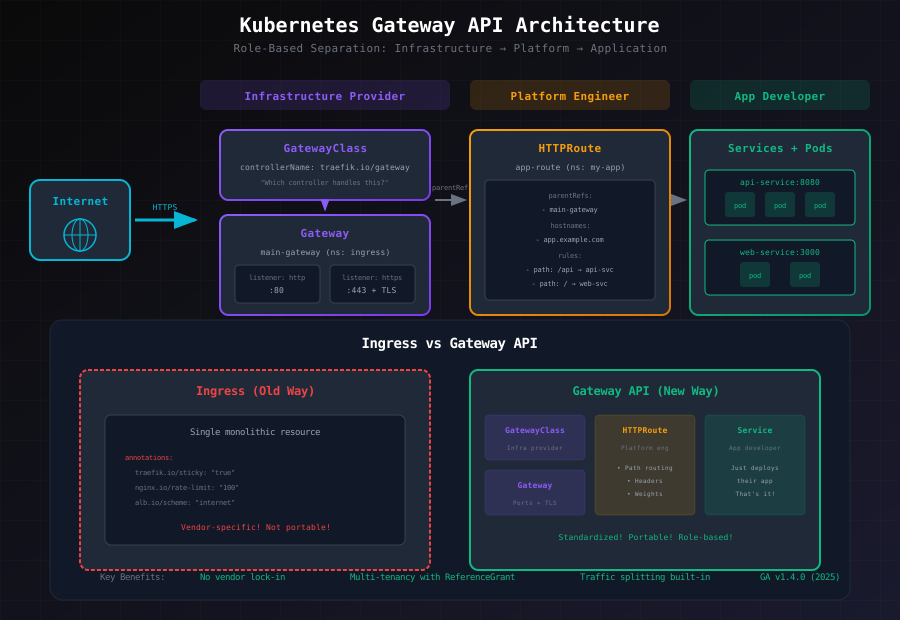
The core insight is beautifully simple: separate concerns into three distinct roles.
The Three Roles (No More Monolithic Chaos)
1. Infrastructure Provider (Usually Me, Drowning In Responsibilities)
This is the cluster admin who:
- Installs the ingress controller (Traefik, Nginx, Istio, etc.)
- Creates a
GatewayClassto define which controller handles what - Creates
Gatewayresources that define entry points, ports, and TLS certificates - Basically: "Here's how external traffic gets into this cluster"
2. Platform Engineer (The Gatekeeper, In A Good Way)
This person:
- Creates
HTTPRoute,GRPCRoute,TCPRoute, etc. - Points routes to specific Gateways
- Defines routing rules (path, header, method matching)
- Controls which namespaces can use which Gateways
- Basically: "Here's the traffic pattern for this application"
3. Application Developer (The Blissfully Unaware)
This person:
- Deploys their app
- Creates a Service
- ... that's it. They don't touch Gateway or GatewayClass.
- The platform engineer figures out the routing.
It sounds simple, but it's genuinely powerful. Instead of one monolithic Ingress with 20 annotations, you have clean separation: Gateway (infrastructure), HTTPRoute (platform), Service (app).
Key Differences at a Glance
| Aspect | Ingress | Gateway API |
|---|---|---|
| API Version | networking.k8s.io/v1 | gateway.networking.k8s.io/v1 |
| Maturity | Stable (but limited) | GA v1.4.0 (2025) |
| Architecture | Monolithic | Role-based separation |
| Routing | Path/host only | Path, host, headers, methods, weights |
| Multi-tenancy | Weak (hard to enforce) | Strong (ReferenceGrant for security) |
| TLS | Basic termination | Termination + passthrough + transparent |
| Vendor Lock-in | High (annotations galore) | None (standardized) |
| Status Info | Basic | Detailed per-rule diagnostics |
Setting It Up (My Trial and Error, Condensed)
Here's what I discovered installing Gateway API. Your mileage may vary depending on your controller.
Step 1: Check If It's Already There
Many modern Kubernetes distributions ship with Gateway API CRDs built-in:
kubectl get crd | grep gateway.networking.k8s.ioYou're looking for:
- gatewayclasses.gateway.networking.k8s.io
- gateways.gateway.networking.k8s.io
- httproutes.gateway.networking.k8s.io
- grpcroutes.gateway.networking.k8s.io
- referencegrants.gateway.networking.k8s.io
If they're there, skip to Step 3. If not, install them:
kubectl apply -f https://github.com/kubernetes-sigs/gateway-api/releases/download/v1.4.0/standard-install.yamlStep 2: Optional – Install Experimental Features
Want TCP, TLS, and UDP routing? Install the experimental CRDs:
kubectl apply -f https://github.com/kubernetes-sigs/gateway-api/releases/download/v1.4.0/experimental-install.yamlThese give you TCPRoute, TLSRoute, and UDPRoute. Fair warning: they're not GA yet, but they work well in practice.
Step 3: Install Your Ingress Controller
Here's where it gets controller-specific. I'll show you three popular options:
Traefik (v3.0+):
helm repo add traefik https://helm.traefik.io
helm repo update
helm install traefik traefik/traefik \
  --namespace traefik \
  --create-namespace \
  --set providers.kubernetesGateway.enabled=true \
  --set providers.kubernetesGateway.experimentalChannel=true \
  --wait
Nginx Gateway Operator:
helm repo add nginx-stable https://helm.nginx.com/stable
helm repo update
helm install nginx-gateway nginx-stable/nginx-gateway \
  --namespace nginx-gateway \
  --create-namespace \
  --wait
Istio:
istioctl install --set profile=demo -yIstio includes Gateway API support by default (one of the reasons I like it).
Step 4: Create the Gateway
This is where the infrastructure provider's work lives:
apiVersion: gateway.networking.k8s.io/v1
kind: Gateway
metadata:
  name: main-gateway
  namespace: ingress
spec:
  gatewayClassName: traefik  # or "nginx", "istio", etc.
  listeners:
  - name: http
    port: 80
    protocol: HTTP
  - name: https
    port: 443
    protocol: HTTPS
    tls:
      mode: Terminate
      certificateRefs:
      - name: tls-cert
        kind: Secret
Note: Traefik uses internal ports (8000/8443) for listeners. Nginx, AWS ALB, and most others use standard 80/443. Check your controller's docs—I learned this the hard way after 20 minutes of "Why isn't this working?"
Step 5: Security (ReferenceGrant)
Now here's where multi-tenancy comes in. By default, routes can't reference services outside their namespace. You control this with ReferenceGrant:
apiVersion: gateway.networking.k8s.io/v1beta1
kind: ReferenceGrant
metadata:
  name: allow-app-routes
  namespace: ingress
spec:
  from:
  - group: gateway.networking.k8s.io
    kind: HTTPRoute
    namespace: "*"  # Only specific namespaces can reference us
  to:
  - group: ""
    kind: Service
This says: "HTTPRoutes from any namespace can reference Services in the ingress namespace." You can lock it down to specific namespaces for tighter security.
The Routing Patterns I Actually Use
Here's the fun part—Gateway API gives you primitives that actually make sense.
Pattern 1: Simple Service Routing
apiVersion: gateway.networking.k8s.io/v1
kind: HTTPRoute
metadata:
  name: app-route
  namespace: my-app
spec:
  parentRefs:
  - name: main-gateway
    namespace: ingress
  hostnames:
  - "app.example.com"
  rules:
  - backendRefs:
    - name: app-service
      port: 8080
Dead simple. No annotations. Just "route this hostname to this service."
Pattern 2: Path-Based Routing (Order Matters!)
apiVersion: gateway.networking.k8s.io/v1
kind: HTTPRoute
metadata:
  name: api-route
  namespace: my-app
spec:
  parentRefs:
  - name: main-gateway
    namespace: ingress
  hostnames:
  - "api.example.com"
  rules:
  - matches:
    - path:
        type: PathPrefix
        value: /v2
    backendRefs:
    - name: api-v2-service
      port: 8080
  - matches:
    - path:
        type: PathPrefix
        value: /
    backendRefs:
    - name: api-v1-service
      port: 8080
Important: More specific paths come first. /v2 before / (the catch-all). Learned that when v1 got all the traffic by accident.
Pattern 3: Traffic Splitting (Canary Deployments)
This is where Gateway API starts to shine:
apiVersion: gateway.networking.k8s.io/v1
kind: HTTPRoute
metadata:
  name: app-canary
  namespace: my-app
spec:
  parentRefs:
  - name: main-gateway
    namespace: ingress
  hostnames:
  - "app.example.com"
  rules:
  - backendRefs:
    - name: app-current
      port: 8080
      weight: 90
    - name: app-new
      port: 8080
      weight: 10
90% to the stable version, 10% to the new one. No annotations. Just... weights. You can gradually shift: 90/10 → 70/30 → 50/50 → 0/100. Rollback by reverting weights.
Pattern 4: Header-Based Routing
apiVersion: gateway.networking.k8s.io/v1
kind: HTTPRoute
metadata:
  name: api-routing
  namespace: my-app
spec:
  parentRefs:
  - name: main-gateway
    namespace: ingress
  hostnames:
  - "api.example.com"
  rules:
  - matches:
    - headers:
      - name: User-Agent
        value: "Mobile"
    backendRefs:
    - name: api-mobile
      port: 8080
  - backendRefs:
    - name: api-default
      port: 8080
Route mobile clients to a dedicated service. Fallback to default for everyone else.
The Route Types (There's More Than HTTP)
Gateway API gives you five route types. HTTP is the common case, but here's what else exists:
HTTPRoute (GA – The Default)
Standard HTTP/HTTPS with L7 inspection. Matches on path, host, headers, methods, query params. Use this for most things.
GRPCRoute (GA)
For gRPC services. Matches on service name and method instead of path. HTTP/2 only.
TCPRoute (Extended Support)
Raw TCP traffic without protocol inspection. Great for databases, custom services, anything non-HTTP.
apiVersion: gateway.networking.k8s.io/v1alpha2
kind: TCPRoute
metadata:
  name: postgres-route
  namespace: database
spec:
  parentRefs:
  - name: main-gateway
    namespace: ingress
  rules:
  - backendRefs:
    - name: postgres-primary
      port: 5432
TLSRoute (Experimental)
Routes TLS traffic based on SNI (Server Name Indication) without decrypting. The backend handles TLS termination.
UDPRoute (Extended Support)
UDP for DNS, game servers, real-time protocols.
The Migration Path (How I'd Do It Today)
Here's the beautiful part about Gateway API: you don't have to rip-and-replace.
- Create HTTPRoute alongside your existing Ingress
- Test HTTPRoute works (both routes serve the same URL)
- Monitor for 1-2 weeks
- Delete Ingress when confident
If HTTPRoute breaks, Ingress still works. No emergency rollbacks needed.
Example: If you have an existing Ingress:
apiVersion: networking.k8s.io/v1
kind: Ingress
metadata:
  name: grafana-ingress
  namespace: monitoring
spec:
  rules:
  - host: "monitoring.example.com"
    http:
      paths:
      - path: /
        pathType: Prefix
        backend:
          service:
            name: grafana
            port:
              number: 3000
  tls:
  - hosts:
    - monitoring.example.com
    secretName: tls-cert
Create this HTTPRoute alongside:
apiVersion: gateway.networking.k8s.io/v1
kind: HTTPRoute
metadata:
  name: grafana-route
  namespace: monitoring
spec:
  parentRefs:
  - name: main-gateway
    namespace: ingress
  hostnames:
  - "monitoring.example.com"
  rules:
  - backendRefs:
    - name: grafana
      port: 3000
Both serve the same URL. Test the HTTPRoute. Keep both running for a couple weeks. If everything looks good, delete the Ingress.
What I Got Wrong (The Learning Process)
Full transparency: setting this up didn't go smoothly.
First attempt, I assumed Gateway API was drop-in compatible with Ingress semantics. It's not—the role separation means different people manage different resources, which changes how you think about organizing YAML.
Second attempt, I tried using Traefik's internal listener ports (8000/8443) without understanding they're internal entrypoints. External traffic still hits 80/443, then Traefik routes internally. I spent 30 minutes debugging "Why can't I reach port 8000?" before reading the docs more carefully.
Third attempt, I forgot ReferenceGrant. Spent another 20 minutes confused why my HTTPRoute couldn't reach the service. Error messages could've been clearer here (not just "denied", but "No ReferenceGrant found"—come on).
These aren't failures, though. They're the normal parts of learning something new. The important thing: once these concepts clicked, the whole model made sense.
Why This Matters (Beyond Just Being Cleaner)
- Vendor neutral – Switch controllers without rewriting routing rules
- Multi-tenant friendly – Enforce clear boundaries with ReferenceGrant
- More expressive – Headers, methods, traffic splitting built-in
- Role-based – Different teams manage different layers without stepping on toes
- Future-proof – This is where Kubernetes networking is headed
When You Should Migrate
Migrate to Gateway API if:
- ✅ Your ingress controller supports it (Traefik 3.0+, Nginx, Istio, AWS ALB all do)
- ✅ You're tired of vendor annotations
- ✅ You want advanced routing (headers, traffic splitting, etc.)
- ✅ You care about clean multi-tenancy
- ✅ You're already planning infrastructure work
Stick with Ingress if:
- ❌ Your controller doesn't support Gateway API
- ❌ Your use case is dead simple (one service, done)
- ❌ Your team isn't ready for a new mental model
- ❌ You have zero time for testing and monitoring
The Roadmap (What's Coming)
Gateway API is GA now, but there's more coming:
Already available (v1.4.0):
- HTTPRoute, GRPCRoute, TCPRoute, TLSRoute, UDPRoute
- Traffic splitting
- Header, method, path-based routing
- Multi-tenancy with ReferenceGrant
- TLS termination and passthrough
On the horizon (v1.5+, 2026):
- Native Sticky Sessions (goodbye Service annotations)
- Rate Limiting (standardized across vendors)
- Circuit Breaking
- Request Transformation
- Better Service Mesh Integration
My Takeaway
Gateway API represents a genuine step forward in how Kubernetes handles traffic routing. It's not revolutionary—it's just... better designed. Cleaner separation of concerns, more expressive routing rules, vendor independence.
If you're managing a Kubernetes cluster or running microservices, it's worth evaluating for your use case. You don't need to migrate everything at once. Pick one application, run both Ingress and HTTPRoute in parallel, monitor for a couple weeks, then expand.
The fact that it's GA now means it's not "future stuff"—it's production-ready, supported by major vendors, and thoroughly spec'd.
I'm genuinely excited about this part of the Kubernetes ecosystem. It feels like networking finally got the attention it deserved.
Curious about Gateway API in your specific setup? Drop a note—I'm still learning too, and there's probably a scenario I haven't hit yet. The community around this is welcoming and helpful (even when error messages aren't).
Resources if you want to dive deeper: