No More .env Slack DMs: A Hands-On Look at varlock
I built a demo project to stress-test varlock — a typed env var manager with AWS Secrets Manager integration. Here is what actually works, what broke immediately, and what I am still not sure about.
No More .env Slack DMs: A Hands-On Look at varlock
Every team I have worked on has the same ritual. A new developer joins. They clone the repo. They run the app. It crashes. They ask in Slack: "hey, can someone send me the .env file?" Someone digs through their Downloads folder, finds a six-month-old copy, and pastes it into a DM. Half the values are wrong. The database password was rotated in January. Nobody told anyone.
I have been on both ends of that DM more times than I want to count. So when I came across varlock — typed env var management with secrets stored in AWS Secrets Manager — I wanted to see if it actually solves the problem or just moves it somewhere else. I built a small demo project and spent an afternoon poking at it. This is what I found.
The Problem varlock Is Trying to Solve
The .env file anti-pattern has three failure modes that tend to compound each other.
First, .env files live outside version control, which means they are invisible to git history, code review, and your future self trying to understand why production behaves differently from staging. The schema — what variables exist, what they mean, what format they expect — is entirely tribal knowledge.
Second, secrets rotate. Passwords change, API keys get revoked, tokens expire. When a secret rotates, someone has to tell every developer, every CI job, and every deployed environment to update their copy. Someone always misses the memo.
Third, and this one has become more relevant recently: AI agents read your filesystem. If your .env lives in the project root, any AI tool with file access can ingest your database password. Most of them do not ask permission.
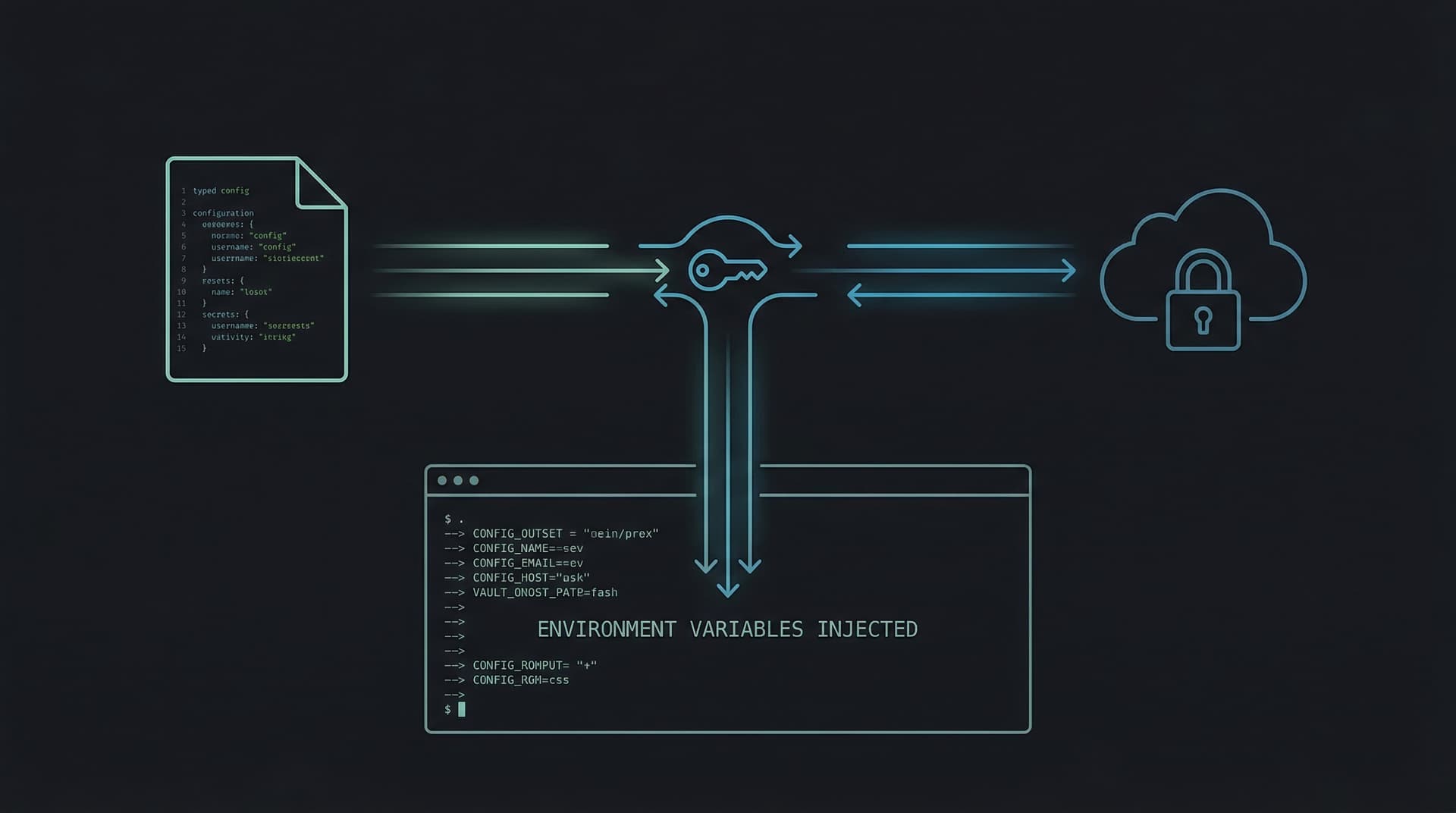
varlock's pitch is: put a typed schema in git, put secrets in AWS Secrets Manager, and let varlock bridge the two at runtime. The schema is safe to commit. Secrets never touch the filesystem.
How It Actually Works
The core concept is a .env.schema file that lives at the root of your project. Think of it as a contract: this is every environment variable this app expects, what type each one is, and whether it has a default or needs to come from somewhere.
# .env.schema

# @plugin(@varlock/aws-secrets-plugin)
# @initAws(region=ap-southeast-2, profile=default)
# @defaultSensitive=false

# @type=string
# @required
APP_NAME=varlock-demo

# @type=enum(development,staging,production)
# @required
APP_ENV=development

# @type=port
# @required
APP_PORT=8080

# @type=boolean
DEBUG=true

# @type=url
# @required
ALLOWED_ORIGIN=http://localhost:3000

# @type=email
ADMIN_EMAIL=[email protected]

# @type=number
MAX_CONNECTIONS=10

# @sensitive
DATABASE_URL=awsSecret("varlock-demo/database-url")

# @sensitive
API_KEY=awsSecret("varlock-demo/api-key")

# @sensitive
DB_PASSWORD=awsSecret("varlock-demo/db-creds#password")
The non-secret config (APP_NAME, APP_ENV, ports, URLs) lives here with its defaults. The secrets reference named values in AWS Secrets Manager. You commit this file. Your .gitignore stays clean. No credentials ever touch the schema.
When you run npx varlock load, it resolves everything:
✅ APP_NAME*      "varlock-demo"
✅ APP_ENV*       "development"
✅ APP_PORT*      8080
✅ DEBUG*         true
✅ ALLOWED_ORIGIN* "http://localhost:3000"
✅ ADMIN_EMAIL*   "[email protected]"
✅ MAX_CONNECTIONS* 10
✅ DATABASE_URL*  🔐sensitive  po▒▒▒▒▒
✅ API_KEY*       🔐sensitive  sk▒▒▒▒▒
✅ DB_PASSWORD*   🔐sensitive  su▒▒▒▒▒
Sensitive values are partially masked in output — you can see the first two characters to confirm the right secret loaded, but the rest is redacted. That is a nice touch.
To actually run your app with everything injected:
npx varlock run -- uv run python app.py
# or: npx varlock run -- node server.js
# or: npx varlock run -- ./any-binary
varlock resolves the schema, fetches secrets from AWS, then launches your process with every value injected as a real environment variable. Your app reads them with os.getenv(), process.env, or whatever is idiomatic in your language. No SDK changes. No new imports. Zero app-side code changes.
Setting Up AWS (The Part Nobody's .env Tutorial Covers)
Before varlock can fetch secrets, you need three things in AWS: the secrets themselves, an IAM user or role with permission to read them, and the AWS CLI configured locally.
Create the secrets in Secrets Manager (I used ap-southeast-2, Sydney region):
aws secretsmanager create-secret \
  --name varlock-demo/database-url \
  --secret-string "postgresql://localhost/demo" \
  --region ap-southeast-2

aws secretsmanager create-secret \
  --name varlock-demo/api-key \
  --secret-string "sk-fake-key-123" \
  --region ap-southeast-2

# JSON secret — varlock can extract individual keys with #key syntax
aws secretsmanager create-secret \
  --name varlock-demo/db-creds \
  --secret-string '{"password":"supersecret","host":"db.local"}' \
  --region ap-southeast-2
The #password syntax in awsSecret("varlock-demo/db-creds#password") is varlock's way of extracting a single key from a JSON secret. That is a good feature — it means you can group related secrets into one JSON object in Secrets Manager rather than creating a separate entry for every field.
varlock picks up AWS credentials from the default profile via @initAws(profile=default) in the schema. No credentials in files, no AWS_ACCESS_KEY_ID hardcoded anywhere. If your team uses SSO or assumed roles, you point varlock at the right profile and it just works.
What Actually Works Well
The zero-file onboarding is real. A new developer clones the repo, runs aws configure once, and then npx varlock load. That is it. No Slack DM. No Downloads folder archaeology. The schema tells them exactly what variables the app expects, and AWS has the actual values. This alone is worth the setup cost for teams that rotate membership or onboard frequently.
Secret rotation becomes automatic. Change varlock-demo/api-key in the AWS Console. The next time anyone runs npx varlock run, they get the new value. No announcements in #dev-general. No one forgets to update their local file. For credentials that rotate on a schedule or after a security incident, this is a meaningful improvement.
Type validation catches real mistakes before they become runtime errors. I tested setting APP_PORT=abc in my shell before running varlock load. It caught it:
❌ APP_PORT*
   └ "abc"
   - Expected a valid port number (1-65535)
The enum validation is also solid — if you set APP_ENV=production when the schema declares @type=enum(development,staging,production), you get a clean error message instead of a string that silently propagates through your app until something breaks at 2am. Email and URL types are validated too. It is the kind of defensive checking that everyone means to add and nobody does.
The AI safety angle is legitimately useful. Any tool with filesystem access — GitHub Copilot, Claude, Cursor, whatever — can read your .env.schema and understand your app's configuration without ever seeing a secret value. The @sensitive annotation means the schema communicates structure and types while the values stay in AWS. For AI-assisted development, this is a real improvement over the current state.
No SDK changes required. I kept the Python app using plain os.getenv(). varlock injects variables into the process environment before launch and then steps aside. You could wrap any existing app — Python, Node, Go, a shell script — without touching its source code.
What Broke Immediately
Here is where I have to be honest, because the marketing materials do not cover this part.
The Homebrew binary is broken for plugins. The docs tell you to install varlock with brew install dmno-dev/tap/varlock. I did that. I ran varlock load. The AWS plugin crashed with:
SyntaxError: Unexpected identifier 'as'. Expected either a closing '}'
or an ',' after a property destructuring pattern.
The standalone Homebrew binary bundles Bun v1.3.9, which cannot parse ESM aliased imports like import { Buffer as Buffer$1 }. The @varlock/aws-secrets-plugin uses exactly that syntax. Every version of the plugin does — I checked all five published versions. The crash is not isolated to the plugin either: it takes down the entire schema load, so even static defaults like APP_NAME=varlock-demo show as undefined. If I had not known to dig into it, I would have concluded that varlock simply does not work and moved on.
The fix is to install varlock via npm instead of brew:
npm install -D varlock
npx varlock load  # this works
This is tracked in GitHub issue #411, acknowledged by the maintainer three days before I ran into it. So at least it is known. But it is a significant first-run experience problem — the primary documented install method fails silently in a maximally confusing way.
You need Node.js even for non-JavaScript projects. My demo is a Python app. To use the AWS plugin, I had to install Node.js and npm, add a package.json, and run npm install. That is real friction for a Python developer who does not have Node in their toolchain. It is not a dealbreaker, but it is worth knowing. The plugin architecture is npm-based, which makes sense given varlock's heritage, but it creates a dependency that feels out of place in a non-JS project.
It is 0.x software. The plugin is on version 0.0.4. varlock itself is at 0.5.0. I say that not to dismiss it but to set expectations: there will be rough edges, breaking changes will happen, and you should read the changelog before upgrading.
The Scenarios Where It Shines
Beyond basic secret loading, there are a few use cases where varlock's model really earns its keep.
Multi-environment config without file proliferation. The @initAws(namePrefix="prod/") option lets you point the same schema at different secret namespaces per environment. Your schema file stays identical across dev, staging, and prod. Only the prefix changes — which you can drive from a CI environment variable. No more .env.staging drifting out of sync with .env.production.
CI/CD without GitHub Secrets sprawl. Instead of manually adding secrets to GitHub's UI, you use the varlock GitHub Action with an OIDC-connected IAM role. No secrets stored in GitHub at all. Secret rotation in AWS propagates automatically to CI runs. This is a meaningful improvement for teams whose list of GitHub Secrets has grown to 40+ entries with no clear owner.
Auditing who accessed what. This is a byproduct of using AWS Secrets Manager rather than varlock specifically, but it is worth naming: every GetSecretValue call shows up in CloudTrail. You know which secrets were accessed, when, and by which IAM principal. Try getting that audit trail from a .env file passed around over Slack.
What I Have Not Tested Yet
A few questions I want to answer before committing to this on a real project:
- Offline behaviour. What happens when your laptop is on a plane and AWS is unreachable? Does varlock fail loudly, fall back gracefully, or cache the last resolved values somewhere?
- Startup latency. Secrets Manager adds a network call to every app startup. For local development, the latency might be annoying. For production containers that start infrequently, less so.
- IAM error messages. What does a developer see when they lack
secretsmanager:GetSecretValuepermission on a secret? Good error messages here would save a lot of debugging time for new team members. - Local variable conflicts. What happens when a shell variable already set in the environment has the same name as a schema variable? Does varlock override it, defer to it, or error?
Where I Land on It
varlock is solving a real problem with a reasonable approach. The core loop — schema in git, secrets in AWS, runtime injection — is sound. The type validation is genuinely useful. The zero-file onboarding story is compelling and actually works once you get past the broken brew install.
The rough edges are real but not damning. The brew binary issue will get fixed. The Node.js dependency is a friction point for non-JS projects but not an architectural problem. For teams already invested in AWS, the operational model maps cleanly onto what you are already doing with IAM and Secrets Manager.
I would not put this on a production project at 0.5.0 without testing the failure modes more thoroughly — especially offline behaviour and error messages. But for a new project where you have the luxury of setting up the toolchain from scratch, it is worth the investment. The alternative is another year of .env Slack DMs.
One thing I keep coming back to: the schema file is useful even if you never use AWS. Having a .env.schema that documents every variable your app expects, with types and defaults, is just good practice. varlock gives you that for free regardless of which secrets backend you use. If you strip everything else out, that alone is worth the npm install.