This 30-Year-Old Architecture Pattern Is Exactly What Your AI Agent Needs
How I stopped building God Agents and started applying the same three-tier separation that fixed enterprise software in the 90s — and why your agent is probably violating it right now.
This 30-Year-Old Architecture Pattern Is Exactly What Your AI Agent Needs
A few months ago I built an agent I was genuinely proud of. It could search the web, summarize documents, check my calendar, query a database, draft emails, and post to Slack. Twelve tools. One prompt. One agent.
Two weeks later, it started hallucinating its own tool names.
I spent an afternoon debugging and eventually realized what had happened: the agent's context window had become a garbage bin. Tool definitions, prior results, half-completed reasoning — all of it piled up into a single undifferentiated mess, and the model just... lost the plot. I'd built what Xu Fei calls a God Agent — a monolith with delusions of grandeur.
The fix came from an unlikely place: a software architecture pattern from 1992.
The 30-Year-Old Pattern Worth Remembering
If you've ever worked in enterprise software, you've run into three-tier architecture. It was a big deal in the 90s, and for good reason: before it, most applications mixed database logic, business rules, and UI code into a single undifferentiated pile. You'd find SQL queries inside button click handlers. Business logic living in stored procedures. The "separation" was vibes-based at best.
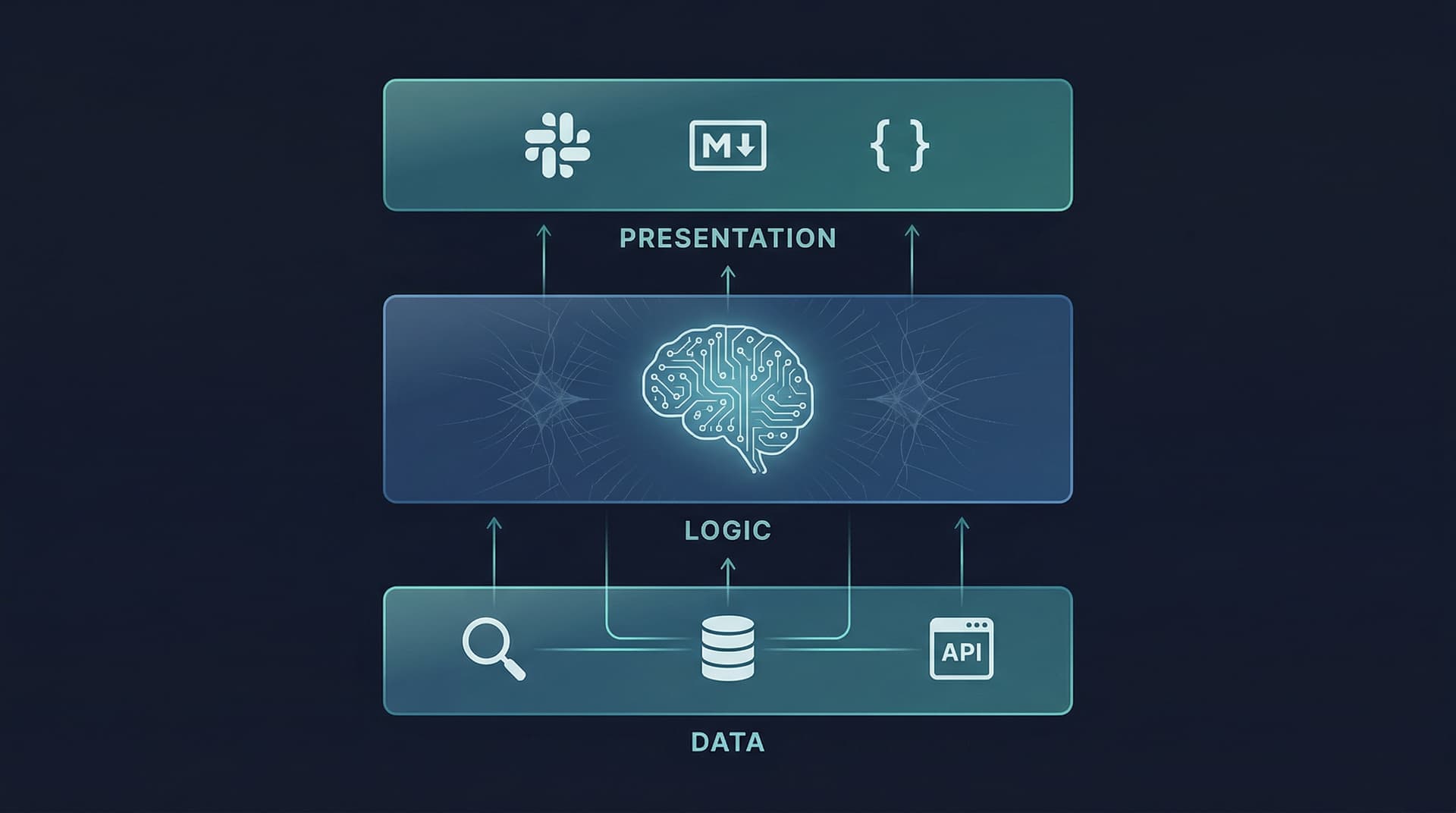
Three-tier architecture fixed this by enforcing a hard split:
- Data tier — talks to databases, APIs, external services. No business logic lives here.
- Logic tier — the brain. Makes decisions, orchestrates, applies rules. Knows nothing about databases or screens.
- Presentation tier — formats and displays. Takes whatever the logic layer hands it and renders it. Nothing else.
The rule is strict: each tier only talks to the one directly adjacent to it. The presentation layer never queries the database. The data layer never makes decisions. This seems rigid until you realize it's exactly what makes the system maintainable — if the database changes, you update the data tier and nothing else breaks. If you're adding a mobile app, you write a new presentation layer and the business logic is untouched.
This became so foundational that practically every large-scale system built in the 2000s used some version of it. Then we spent the next decade inventing microservices and serverless to solve the problems that three-tier had created. But the core insight — separate your concerns at meaningful boundaries — never went stale.
Where Agents Go Wrong
Here's the thing about most AI agents being built today: they're 1990s monoliths with a GPU attached.
The God Agent pattern is seductive because it's easy. Write a big system prompt, attach a pile of tools, throw queries at it. It works! Until it doesn't.
What actually happens as you add tools and complexity:
Context Window Pollution — Xu Fei's term, and it's perfect. Every tool definition eats tokens. Every prior tool call result stays in context. Every piece of reasoning the agent wrote while using tool #3 is still sitting there when it's trying to use tool #9. The model's effective attention gets diluted across a growing wall of irrelevant noise.
Invisible coupling — When your search tools, your planning logic, and your Slack formatting all live in one prompt, changing any of them affects all of them. Want to swap in a cheaper model for the tool-calling parts? You'd have to split up the agent you never designed to be split. Want to add a new output channel? Touch the main prompt and hope nothing breaks.
Debugging in the dark — When a monolithic agent fails, you have no idea which concern failed. Did it call the wrong tool? Reason incorrectly? Format wrong? The failure is somewhere in a single 200-turn context window. Have fun.
Christian Posta noticed this same pattern when comparing AI agents to API architecture: we went through this exact problem with APIs in the 2000s (spaghetti SOA, anyone?), and the fix was the same — layered separation.
The Mapping
The three-tier pattern maps onto AI agents almost embarrassingly cleanly:
| Classic Tier | Agent Equivalent | Responsibility |
|---|---|---|
| Data tier | Tool executor | Call APIs, run functions, hit databases. No reasoning. |
| Logic tier | Planner / orchestrator | Decide what to do, sequence steps, use the LLM. |
| Presentation tier | Output formatter | Take structured results, render for a channel. |
The logic tier is where your frontier model and complex prompt lives. The tool executor is where cheap, fast, deterministic function dispatch happens — it doesn't need a big model, it doesn't need a complex prompt, it just needs to call the right function. The presenter is where you answer "is this for Slack, markdown, or a JSON API?" — and critically, that question has nothing to do with how the research was done.
The boundaries matter. The planner never formats output. The presenter never calls tools. The executor never reasons.
What This Looks Like in Practice
Let me show you both versions.
The God Agent (and why it hurts)
import anthropic

client = anthropic.Anthropic()

# Every tool, all at once, always in context
TOOLS = [
    {"name": "web_search", "description": "Search the web", "input_schema": {"type": "object", "properties": {"query": {"type": "string"}}, "required": ["query"]}},
    {"name": "fetch_url", "description": "Fetch a URL", "input_schema": {"type": "object", "properties": {"url": {"type": "string"}}, "required": ["url"]}},
    # ... add 8 more tools here and watch the prompt balloon
]

def god_agent(query: str, output_format: str = "markdown") -> str:
    """
    Does everything. Research, reasoning, AND formatting.
    To change the output format, you touch the agent's core system prompt.
    To add a new output channel, same thing.
    To swap to a cheaper model for just the tool calls? You can't.
    """
    system = f"""You are a helpful research assistant.
    Search for information, analyze it thoroughly, and respond in {output_format} format.
    When formatting for {output_format}, use appropriate conventions for that format.
    Be comprehensive. Use multiple tools if needed. Format everything correctly for {output_format}.
    """

    messages = [{"role": "user", "content": query}]

    while True:
        response = client.messages.create(
            model="claude-opus-4-6",
            max_tokens=4096,
            system=system,
            tools=TOOLS,
            messages=messages,
        )

        if response.stop_reason == "end_turn":
            return response.content[0].text  # Hope this is formatted right

        tool_results = []
        for block in response.content:
            if block.type == "tool_use":
                result = execute_tool(block.name, block.input)  # Dispatch buried in here
                tool_results.append({"type": "tool_result", "tool_use_id": block.id, "content": result})

        messages.append({"role": "assistant", "content": response.content})
        messages.append({"role": "user", "content": tool_results})
This works fine for the first three features. By feature ten, you're debugging prompt interactions at midnight.
The Three-Tier Agent
import anthropic
import json
from abc import ABC, abstractmethod
from dataclasses import dataclass, field

client = anthropic.Anthropic()


# ─────────────────────────────────────────────────
# TIER 1: DATA LAYER
# Pure function dispatch. No reasoning. No formatting.
# This tier doesn't even know what a "query" means conceptually.
# ─────────────────────────────────────────────────

TOOL_DEFINITIONS = [
    {
        "name": "web_search",
        "description": "Search the web for information",
        "input_schema": {"type": "object", "properties": {"query": {"type": "string"}}, "required": ["query"]},
    },
    {
        "name": "fetch_url",
        "description": "Fetch content from a URL",
        "input_schema": {"type": "object", "properties": {"url": {"type": "string"}}, "required": ["url"]},
    },
]

def execute_tool(name: str, inputs: dict) -> str:
    """Just dispatches. No LLM involved. Swap implementations freely."""
    if name == "web_search":
        # swap out the search provider here without touching anything else
        return f"[Search results for: {inputs['query']}]"
    elif name == "fetch_url":
        return f"[Content from: {inputs['url']}]"
    return f"Unknown tool: {name}"


# ─────────────────────────────────────────────────
# TIER 2: LOGIC LAYER
# The brain. Orchestrates, reasons, decides.
# Returns structured data — knows nothing about Slack or markdown.
# ─────────────────────────────────────────────────

@dataclass
class ResearchResult:
    """Channel-agnostic output from the planner. Just facts."""
    query: str
    summary: str
    key_points: list[str] = field(default_factory=list)
    sources: list[str] = field(default_factory=list)


def planner_agent(query: str) -> ResearchResult:
    """
    Uses tools to research, synthesizes findings into structured data.
    Has no opinion about how the result will be displayed.
    To swap models (e.g. haiku for cheaper runs), change it here only.
    """
    system = """You are a research planner. Gather information using tools, then synthesize.

Return ONLY valid JSON:
{"summary": "...", "key_points": ["..."], "sources": ["..."]}
"""
    messages = [{"role": "user", "content": f"Research: {query}"}]

    while True:
        response = client.messages.create(
            model="claude-opus-4-6",  # swap model here — nothing else changes
            max_tokens=2048,
            system=system,
            tools=TOOL_DEFINITIONS,  # only the tools it needs, not every tool you have
            messages=messages,
        )

        if response.stop_reason == "end_turn":
            text = next(b.text for b in response.content if hasattr(b, "text"))
            data = json.loads(text)
            return ResearchResult(
                query=query,
                summary=data["summary"],
                key_points=data["key_points"],
                sources=data["sources"],
            )

        tool_results = []
        for block in response.content:
            if block.type == "tool_use":
                result = execute_tool(block.name, block.input)  # calls Tier 1
                tool_results.append({"type": "tool_result", "tool_use_id": block.id, "content": result})

        messages.append({"role": "assistant", "content": response.content})
        messages.append({"role": "user", "content": tool_results})


# ─────────────────────────────────────────────────
# TIER 3: PRESENTATION LAYER
# Knows about channels. Knows nothing about tools or planning.
# Add a new channel: write a new class. Touch nothing else.
# ─────────────────────────────────────────────────

class Presenter(ABC):
    @abstractmethod
    def present(self, result: ResearchResult) -> str: ...


class MarkdownPresenter(Presenter):
    def present(self, result: ResearchResult) -> str:
        lines = [f"# {result.query}\n", result.summary, "\n## Key Points"]
        lines += [f"- {pt}" for pt in result.key_points]
        lines += ["\n## Sources"] + [f"- {s}" for s in result.sources]
        return "\n".join(lines)


class SlackPresenter(Presenter):
    def present(self, result: ResearchResult) -> str:
        points = "\n".join(f"• {pt}" for pt in result.key_points)
        return f"*{result.query}*\n\n{result.summary}\n\n*Key Points:*\n{points}"


class JSONPresenter(Presenter):
    def present(self, result: ResearchResult) -> str:
        return json.dumps({
            "query": result.query,
            "summary": result.summary,
            "key_points": result.key_points,
            "sources": result.sources,
        }, indent=2)


# ─────────────────────────────────────────────────
# WIRING IT TOGETHER
# ─────────────────────────────────────────────────

def research(query: str, presenter: Presenter) -> str:
    result = planner_agent(query)    # Tier 2 calls Tier 1 internally
    return presenter.present(result)  # Tier 3 formats the output


# The same research, three output channels, zero changes to the logic
query = "What are the main approaches to memory in AI agents?"

print(research(query, MarkdownPresenter()))  # for the blog
print(research(query, SlackPresenter()))     # for the oncall bot
print(research(query, JSONPresenter()))      # for the API consumer
That last section is the point. Same query. Same research. Same reasoning. Three output channels — and the planner didn't blink. When you want to add a Discord channel, you write DiscordPresenter. When you want to replace the search backend, you update execute_tool. When you want to try a different model, you change one line in planner_agent. Nothing else touches.
The Swappability Test
Here's a concrete checklist I use now before calling an agent "done":
Can you swap the LLM in the logic tier without touching tools or output? If yes, you've separated data from logic.
Can you add a new output channel without touching the planner? If yes, you've separated logic from presentation.
Can you replace a tool's implementation (e.g. switch search providers) without touching the prompt? If yes, your data tier is actually a data tier.
Three yes answers and you have a three-tier agent. If any answer is no, that boundary is blurred and you'll pay for it later.
This Isn't Just About Clean Code
I want to be direct about why this matters beyond software aesthetics.
Cost. The logic tier is where your expensive frontier model lives. The tool executor doesn't need reasoning capability — it needs to reliably call a function. Running execute_tool through claude-haiku-4-5 (or not through an LLM at all) is dramatically cheaper than routing it through Opus. Separation lets you right-size your models.
Debuggability. When a three-tier agent fails, you know exactly where to look. Wrong output format? Presenter bug. Wrong information? Planner or tool bug. Tool returned bad data? Data tier. In a monolith, failure is somewhere in the context window. Good luck.
Governance. Microsoft Azure's agent design patterns and Salesforce's enterprise agentic architecture both lean on this separation specifically because governance controls can be applied at the logic tier boundary. Business rules don't belong in the presentation layer — in 1995 or 2026.
Context hygiene. The planner's context window contains planner things. Tool results get processed and distilled into ResearchResult before the presenter ever sees them. Nobody accumulates context they don't need. Xu Fei's "Context Window Pollution" problem is architectural, and you fix it architecturally.
What the 90s Got Right
The engineers who designed three-tier architecture weren't being clever. They were tired of unmaintainable systems and drew a line at the natural seam in the problem. Databases talk to business logic. Business logic talks to presentation. That's it.
We're in the same moment with agents. The natural seams are the same: tools that do things, logic that decides things, presentation that shows things. Mixing them works until it doesn't, and then it's really hard to unwind.
The pattern is 30 years old. The problem it solves is older than that. And apparently it's still relevant — because the best argument for applying it to AI agents is the same one that applied to Oracle and ASP in 1995: your system will change, and you want to change one thing at a time.
If you want to run the full demo, the code is self-contained above — just add your ANTHROPIC_API_KEY and replace the stub execute_tool implementations with real search and fetch calls. The architecture holds regardless of what's inside each tier.