Stop Guessing Versions: How I Finally Escaped Timestamp Hell
The messy journey from timestamp chaos to semantic versioning with automated releases, changelogs, and a workflow that actually makes sense (most days)
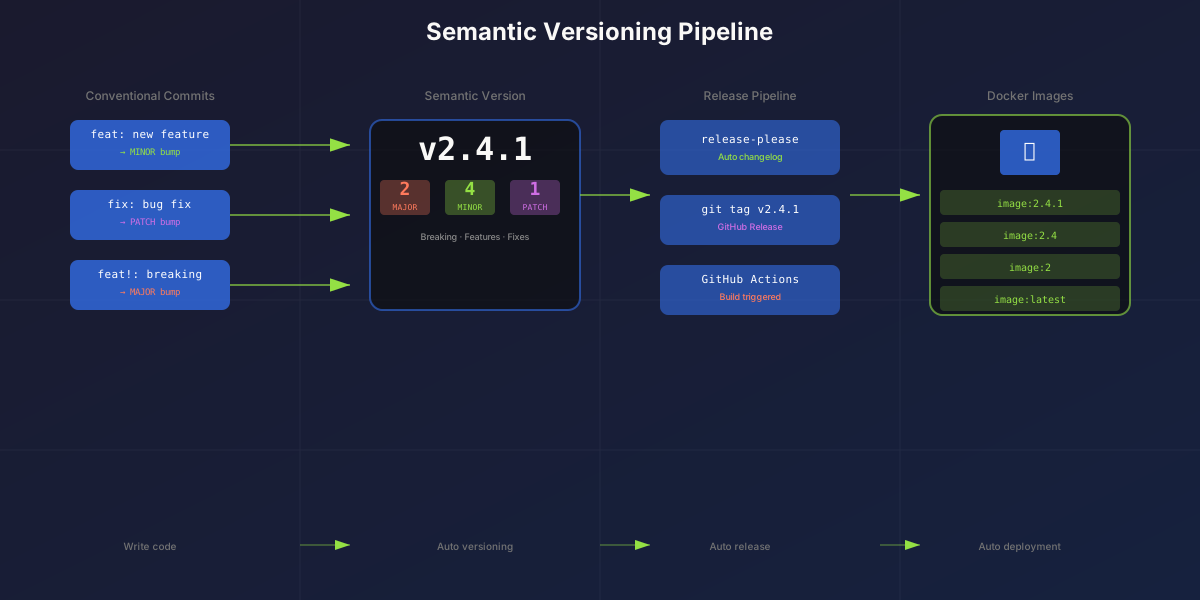
"What version is deployed in production?"
I stared at my Docker images tagged 20251215-143052, 20251218-091234, 20251219-162847. Three timestamps that told me absolutely nothing except when I'd forgotten to eat lunch that day. Which one had the bug fix? Which one added the new feature? Which one should I rollback to when everything inevitably caught fire at 2 AM?
(Spoiler: I picked the wrong one twice before getting it right. Classic.)
This is the story of how I went from timestamp chaos to proper semantic versioning with automated releases, changelogs, and a workflow that doesn't make me question my life choices every deployment.
The Problem with Timestamps (Or: How I Learned to Stop Trusting Myself)
My original Docker workflow was beautifully simple: push to main, build image, tag with timestamp. Deploy. What could go wrong?
tags: |
  type=raw,value={{date 'YYYYMMDD-HHmmss'}}
  type=raw,value=latest
Turns out, a lot could go wrong:
- No idea what changed - Was
20251218-091234a bug fix or the change that broke authentication? (It was both. Don't ask.) - Rollback roulette - Staring at timestamps at 3 AM trying to remember which one was "the last good version" is not a fun game
- No changelog - Future me had absolutely zero context about what past me was thinking
- Manual everything - I was the release manager, the change log writer, and the person who inevitably screwed it up
The final straw? A teammate asked "what's new in production?" and I replied "...stuff?" That's when I knew I needed a system. A real one. Not just "commit and pray."
Semantic Versioning: The Universal Language (That I Should've Learned Years Ago)
Semantic Versioning (SemVer) is a version format that actually communicates meaning: MAJOR.MINOR.PATCH
v2.4.1
 │ │ │
 │ │ └── PATCH: Bug fixes (backwards compatible)
 │ └──── MINOR: New features (backwards compatible)
 └────── MAJOR: Breaking changes (not backwards compatible)
When you see v2.4.1, you instantly know:
- It's the 2nd major version (there were breaking changes since v1)
- 4 feature releases since v2.0.0
- 1 bug fix since v2.4.0
Compare that to 20251218-091234. One tells you exactly what kind of update it is. The other tells you I deployed before my coffee kicked in.
When to Bump Each Number (The Rules I Wish I'd Known Earlier)
| Change Type | Example | Version Bump |
|---|---|---|
| Fix a bug without changing API | Fix typo, fix crash | 1.0.0 → 1.0.1 |
| Add new feature, old code still works | Add new page, new endpoint | 1.0.1 → 1.1.0 |
| Change that breaks existing behavior | Rename API, remove feature | 1.1.0 → 2.0.0 |
The beauty is that anyone can make decisions based on version numbers:
1.0.x→ Safe to update, just bug fixes1.x.0→ New features, should still workx.0.0→ Breaking changes, read the changelog! (And maybe pour some coffee first)
Conventional Commits: The Foundation (And Why I Resisted Them at First)
Here's the trick: how do you know whether to bump major, minor, or patch? You could decide manually each time, but that's how we ended up with timestamps in the first place.
Enter Conventional Commits - a commit message format that I initially thought was "overkill for my little project" (narrator: it wasn't):
feat: add dark mode toggle        # → bumps MINOR
fix: resolve login crash          # → bumps PATCH
feat!: redesign API               # → bumps MAJOR (breaking!)
docs: update README               # → no version bump
chore: upgrade dependencies       # → no version bump
The format is simple: type: description
| Prefix | Meaning | Version Bump |
|---|---|---|
fix: | Bug fix | PATCH |
feat: | New feature | MINOR |
feat!: or BREAKING CHANGE: | Breaking change | MAJOR |
docs:, chore:, test:, refactor: | Maintenance | None |
With conventional commits, automation tools can:
- Read your commit history
- Determine the appropriate version bump
- Generate a changelog automatically
- Create a release
No more guessing. No more manual decisions. No more "what did I even deploy?"
(Fun fact: I typo'd commit messages about 15 times before muscle memory kicked in. Thank goodness for commit hooks.)
The Automated Release Pipeline (Or: How I Stopped Doing Work)
Here's what I set up using GitHub Actions, release-please, and conventional commits. This part took me a weekend to configure and has saved me hours every week since:
Developer commits with conventional format
              ↓
       feat: add contact form
       fix: resolve mobile bug
       feat: add dark mode
              ↓
    Merge PR to main branch
              ↓
    release-please analyzes commits
              ↓
    Creates a "Release PR" with:
    - Version bump (1.1.0 → 1.2.0)
    - Updated CHANGELOG.md
    - Updated package.json version
              ↓
    Developer merges Release PR
              ↓
    release-please creates:
    - Git tag (v1.2.0)
    - GitHub Release with notes
              ↓
    Docker workflow triggers on v* tag
    Builds image with semver tags:
    - 1.2.0, 1.2, 1, latest
              ↓
    ArgoCD picks up new image
The key insight that blew my mind: merging to main doesn't immediately release. Instead, release-please accumulates changes in a Release PR. When you're ready to ship, you merge the Release PR.
This gives you control. You can merge features all week, then release on Friday. Or Tuesday. Or whenever you feel like things are stable enough. (For me, that's usually "after I've tested it at least once.")
Implementation: Step by Step (Including the Parts I Messed Up)
1. CI Workflow for PR Checks
First, I added a CI workflow that runs on every PR (because I can't be trusted to remember to run tests locally):
# .github/workflows/ci.yml
name: CI

on:
  push:
    branches: [main, dev]
  pull_request:
    branches: [main, dev]

jobs:
  lint:
    name: Lint
    runs-on: ubuntu-latest
    steps:
      - uses: actions/checkout@v4
      - uses: pnpm/action-setup@v4
        with:
          version: 9
      - uses: actions/setup-node@v4
        with:
          node-version: 20
          cache: 'pnpm'
      - run: pnpm install --frozen-lockfile
      - run: pnpm lint

  typecheck:
    name: Type Check
    runs-on: ubuntu-latest
    steps:
      - uses: actions/checkout@v4
      - uses: pnpm/action-setup@v4
        with:
          version: 9
      - uses: actions/setup-node@v4
        with:
          node-version: 20
          cache: 'pnpm'
      - run: pnpm install --frozen-lockfile
      - run: pnpm typecheck

  test:
    name: Test
    runs-on: ubuntu-latest
    steps:
      - uses: actions/checkout@v4
      - uses: pnpm/action-setup@v4
        with:
          version: 9
      - uses: actions/setup-node@v4
        with:
          node-version: 20
          cache: 'pnpm'
      - run: pnpm install --frozen-lockfile
      - run: pnpm test

  build:
    name: Build
    runs-on: ubuntu-latest
    needs: [lint, typecheck, test]
    steps:
      - uses: actions/checkout@v4
      - uses: pnpm/action-setup@v4
        with:
          version: 9
      - uses: actions/setup-node@v4
        with:
          node-version: 20
          cache: 'pnpm'
      - run: pnpm install --frozen-lockfile
      - run: pnpm build
This ensures every PR passes lint, type checks, tests, and build before merging. It's saved me from myself more times than I can count.
2. Release Please Workflow
Next, the magic that makes releases actually pleasant:
# .github/workflows/release.yml
name: Release

on:
  push:
    branches: [main]

permissions:
  contents: write
  pull-requests: write

jobs:
  release-please:
    name: Release Please
    runs-on: ubuntu-latest
    steps:
      - name: Run Release Please
        uses: googleapis/release-please-action@v4
        with:
          release-type: node
          token: ${{ secrets.GITHUB_TOKEN }}
That's it. Seriously. Twenty-three lines of YAML that handle:
- Analyzing commits since the last release
- Determining the version bump
- Creating/updating the Release PR
- Generating changelog entries
- Creating GitHub releases when the PR is merged
I spent more time deciding what to name the file than writing it.
3. Docker Workflow with Semver Tags
Updated the Docker workflow to trigger on version tags (this part I actually got right on the first try, miraculously):
# .github/workflows/docker-build-push.yml
name: Build and Push Docker Image

on:
  push:
    tags: ['v*']  # Only trigger on version tags
  workflow_dispatch:

jobs:
  build-and-push:
    runs-on: ubuntu-latest
    steps:
      - uses: actions/checkout@v4

      - uses: docker/setup-buildx-action@v3

      - uses: docker/login-action@v3
        with:
          registry: ghcr.io
          username: ${{ github.actor }}
          password: ${{ secrets.GITHUB_TOKEN }}

      - name: Extract metadata
        id: meta
        uses: docker/metadata-action@v5
        with:
          images: ghcr.io/${{ github.repository_owner }}/portfolio
          tags: |
            type=semver,pattern={{version}}
            type=semver,pattern={{major}}.{{minor}}
            type=semver,pattern={{major}}
            type=raw,value=latest

      - uses: docker/build-push-action@v5
        with:
          context: .
          push: true
          tags: ${{ steps.meta.outputs.tags }}
          cache-from: type=gha
          cache-to: type=gha,mode=max
Now when v1.2.3 is released, Docker creates:
ghcr.io/username/portfolio:1.2.3(exact version)ghcr.io/username/portfolio:1.2(minor version family)ghcr.io/username/portfolio:1(major version family)ghcr.io/username/portfolio:latest(for the brave)
ArgoCD can pin to 1.2 for stability or latest for living dangerously.
4. Local Commit Enforcement (Teaching Myself Discipline)
To enforce conventional commits locally (because I cannot be trusted), I added commitlint and husky:
pnpm add -D @commitlint/cli @commitlint/config-conventional husky
pnpm exec husky init
// commitlint.config.js
export default {
extends: ['@commitlint/config-conventional'],
};# .husky/commit-msg
pnpm exec commitlint --edit $1# .husky/pre-commit
pnpm lint && pnpm typecheckNow when I inevitably forget the format:
$ git commit -m "fixed stuff"
⧗   input: fixed stuff
✖   subject may not be empty [subject-empty]
✖   type may not be empty [type-empty]

✖   found 2 problems, 0 warnings
But a proper message works:
$ git commit -m "fix: resolve navigation bug on mobile"
[main abc1234] fix: resolve navigation bug on mobile
(I still try to commit with bad messages about once a week. Old habits die hard.)
The Complete Workflow (In Practice)
Here's how it all actually works day-to-day:
Daily Development
# Create feature branch
git checkout dev
git checkout -b feature/dark-mode

# Work on feature...
git commit -m "feat: add dark mode toggle component"
git commit -m "feat: add theme persistence to localStorage"
git commit -m "fix: resolve flash of unstyled content"

# Open PR to dev
git push -u origin feature/dark-mode
# CI runs: lint, typecheck, test, build
# Merge when green (and after I've actually tested it)
Weekly Release (Or Whenever I Feel Lucky)
# Open PR: dev → main
# CI runs again (belt and suspenders approach)
# Merge when ready

# release-please automatically creates Release PR:
# "chore(main): release 1.3.0"
# - Updates CHANGELOG.md
# - Bumps version in package.json

# Review the Release PR
# (This is where I discover I typo'd something in a commit message)
# Merge when ready to ship

# Automatically:
# - Git tag v1.3.0 created
# - GitHub Release published
# - Docker builds with tags: 1.3.0, 1.3, 1, latest
# - ArgoCD deploys to cluster
# - I breathe a sigh of relief
The Generated Changelog (The Gift That Keeps on Giving)
After a few releases, your CHANGELOG.md looks like this:
# Changelog

## [1.3.0](https://github.com/user/repo/compare/v1.2.0...v1.3.0) (2025-12-20)

### Features

* add dark mode toggle component ([abc1234](commit-link))
* add theme persistence to localStorage ([def5678](commit-link))

### Bug Fixes

* resolve flash of unstyled content ([ghi9012](commit-link))

## [1.2.0](https://github.com/user/repo/compare/v1.1.0...v1.2.0) (2025-12-13)

### Features

* add contact form with validation ([jkl3456](commit-link))
Beautiful. Automatic. Actually useful when someone asks "what changed?"
Branch Protection: The Final Safety Net
To prevent 3 AM me from doing something regrettable, I enabled branch protection on main:
- Go to Settings → Branches → Add rule
- Branch name pattern:
main - Enable:
- ✅ Require a pull request before merging
- ✅ Require status checks to pass (select: Lint, Type Check, Test, Build)
- ✅ Do not allow bypassing the above settings
Now nothing gets to production without passing CI and going through a PR. Even when I'm very confident something will "definitely work this time."
(It usually doesn't.)
Lessons Learned (The Hard Way, Naturally)
After running this setup for a few months:
-
Conventional commits feel weird at first - For about a week I resisted. Then muscle memory kicked in and now I can't imagine going back. The automation payoff is absolutely worth the learning curve.
-
The Release PR is genius - You control when to ship. I can merge features all week, then release when things feel stable. Or when Friday afternoon looks calm. (It never does.)
-
Semver communicates intent - When I see
v2.0.0I know to read the changelog carefully. When I seev1.4.2I know it's probably safe to update. Timestamps communicated "I deployed at an odd time on a Wednesday." -
Changelogs are documentation for future you - Future me has thanked past me many times for knowing exactly what changed in v1.4.2. Past me should've started this years ago.
-
Automation removes friction - When releasing is one click, you release more often. Smaller releases = less risk = easier rollbacks when things go sideways.
-
I still mess up commit messages - Even with hooks. Even with practice. But at least now the computer catches my mistakes before they become versioned chaos.
Quick Reference (For When You Forget Everything)
Commit Message Format
type(scope): description

feat: add new feature
fix: bug fix
docs: documentation only
style: formatting, missing semicolons, etc.
refactor: code change that neither fixes a bug nor adds a feature
test: adding missing tests
chore: updating build tasks, package manager configs, etc.
Version Bumps
| Commit | Example | Bump |
|---|---|---|
fix: | fix: resolve crash on login | PATCH (1.0.0 → 1.0.1) |
feat: | feat: add user profiles | MINOR (1.0.1 → 1.1.0) |
feat!: | feat!: redesign API | MAJOR (1.1.0 → 2.0.0) |
BREAKING CHANGE: in body | Any type with breaking footer | MAJOR |
Tools Used
- release-please - Automated releases (does the thinking so I don't have to)
- commitlint - Commit message linting (catches my typos)
- husky - Git hooks (forces me to follow my own rules)
- Conventional Commits - Commit message spec (surprisingly readable)
- Semantic Versioning - Version numbering spec (the standard everyone should use)
Conclusion (Or: How I Stopped Worrying and Learned to Love Automation)
Switching from timestamp tags to semantic versioning with automated releases was one of those changes that seemed like overkill... until it very much wasn't.
The first time I needed to rollback and could confidently say "deploy v1.2.3, that was before the bug" instead of squinting at timestamps and praying - that's when it clicked.
The first time a user asked "what's new?" and I just sent them the automatically generated changelog instead of stammering "uh... stuff?" - that's when it clicked.
The first time I merged the Release PR on Friday afternoon and went home knowing production would update safely without me hovering over the deploy button - that's when it really clicked.
It's a bit of setup (okay, it's a weekend project if you're me and make mistakes along the way), but it's the kind of automation that pays dividends forever. Every week. Every release. Every time you don't have to remember what 20251218-091234 was supposed to do.
Now if you'll excuse me, I have a Release PR to merge. And this time, I even remembered to actually test the changes first.
(A personal best, honestly.)