Building a Live Infrastructure Dashboard with Chaos Monkey: Letting Visitors Break My Cluster
How I built a real-time Kubernetes metrics dashboard that lets visitors delete pods and watch self-healing in action. Covers Prometheus integration, SSE streaming, secure RBAC, and the engineering behind controlled chaos.
Building a Live Infrastructure Dashboard with Chaos Monkey: Letting Visitors Break My Cluster
I wanted to do something a bit reckless: give random internet strangers a button that deletes pods in my Kubernetes cluster.
Not my actual application pods, mind you. But real pods, in a real cluster, getting terminated by anyone who visits my site. Then watching Kubernetes automatically bring them back to life.
Why? Because there's no better way to demonstrate self-healing than letting people break things themselves.
The End Result
Visit /infra (currently disabled) on this site and you'll see:
- Real-time metrics from my K3s cluster (pods, memory, CPU, node health)
- A Chaos Monkey button that deletes a random pod when you click it
- Live updates showing pods terminate and respawn
The whole thing updates every 5 seconds via Server-Sent Events. It's not a simulation—you're looking at actual Prometheus data from my homelab.
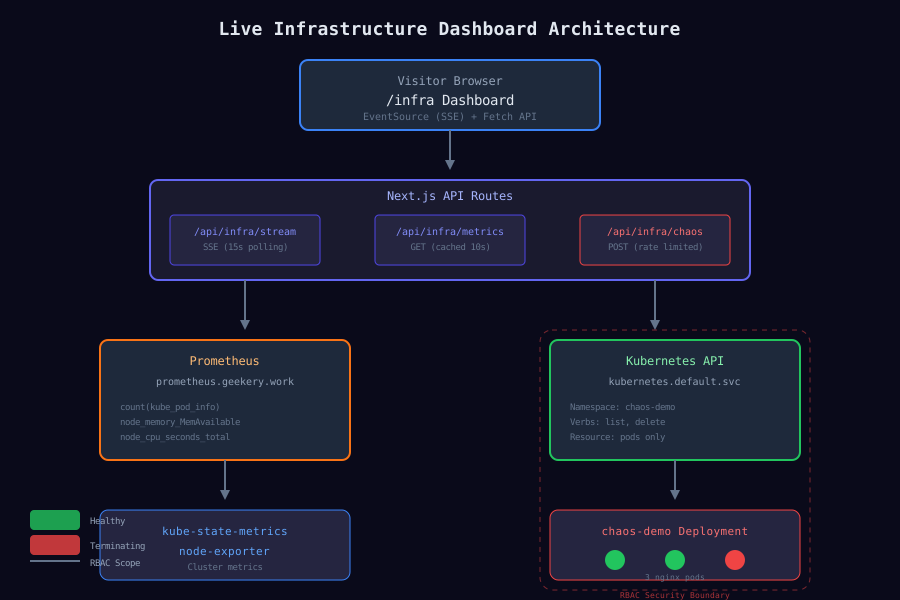
Architecture Overview
Here's how all the pieces fit together:
┌─────────────────────────────────────────────────────────────────┐
│                         Visitors                                 │
└─────────────────────────────────────────────────────────────────┘
                              │
                              ▼
┌─────────────────────────────────────────────────────────────────┐
│                    /infra Dashboard                              │
│  ┌─────────────────┐  ┌─────────────────┐  ┌─────────────────┐  │
│  │  Metric Cards   │  │  Node Status    │  │  Chaos Monkey   │  │
│  │  (CPU/Mem/Pods) │  │  (Health List)  │  │  (Kill Button)  │  │
│  └────────┬────────┘  └────────┬────────┘  └────────┬────────┘  │
└───────────┼─────────────────────┼─────────────────────┼─────────┘
            │                     │                     │
            ▼                     ▼                     ▼
┌─────────────────────────────────────────────────────────────────┐
│                       API Routes                                 │
│  /api/infra/stream (SSE)    /api/infra/chaos (POST)             │
└─────────────┬────────────────────────────┬──────────────────────┘
              │                            │
              ▼                            ▼
┌─────────────────────────┐    ┌─────────────────────────────────┐
│      Prometheus         │    │     Kubernetes API              │
│  prometheus.geekery.work│    │  kubernetes.default.svc         │
│  (Metrics queries)      │    │  (Pod deletion)                 │
└─────────────────────────┘    └─────────────────────────────────┘
Three main components:
- Prometheus Integration - Fetches cluster metrics via PromQL
- SSE Streaming - Pushes updates to the browser every 15 seconds
- Chaos Monkey API - Controlled pod deletion with strict RBAC
Let's dig into each one.
Part 1: Prometheus Integration
The Queries
Prometheus is already running in my cluster, scraping metrics from kube-state-metrics and node-exporter. Here are the PromQL queries that power the dashboard:
// src/lib/infra/queries.ts
export const QUERIES = {
  // Total pods in cluster
  podCount: 'count(kube_pod_info)',

  // Running pods only (sum because the metric is 1 when in phase, 0 otherwise)
  podRunning: 'sum(kube_pod_status_phase{phase="Running"})',

  // Memory usage across all nodes
  memoryUsedPercent: `(1 - sum(node_memory_MemAvailable_bytes) / sum(node_memory_MemTotal_bytes)) * 100`,
  memoryUsedBytes: `sum(node_memory_MemTotal_bytes - node_memory_MemAvailable_bytes)`,
  memoryTotalBytes: `sum(node_memory_MemTotal_bytes)`,

  // CPU usage (inverse of idle time)
  cpuUsedPercent: `100 - (avg(rate(node_cpu_seconds_total{mode="idle"}[5m])) * 100)`,

  // Node readiness
  nodeReady: `kube_node_status_condition{condition="Ready",status="true"}`,

  // Per-node memory
  nodeMemoryUsedBytes: `node_memory_MemTotal_bytes - node_memory_MemAvailable_bytes`,
  nodeMemoryTotalBytes: `node_memory_MemTotal_bytes`,
};
The Prometheus Client
The client fetches these queries and assembles them into a single metrics snapshot:
// src/lib/infra/prometheus.ts
const PROMETHEUS_URL = 'https://prometheus.geekery.work';
const CACHE_TTL_MS = 10_000; // 10 second cache

async function queryPrometheus(promql: string): Promise<number | null> {
  const url = `${PROMETHEUS_URL}/api/v1/query?query=${encodeURIComponent(promql)}`;

  const response = await fetch(url, {
    headers: { Accept: 'application/json' },
    next: { revalidate: 10 },
  });

  if (!response.ok) return null;

  const data = await response.json();

  // Prometheus returns results in a specific format
  if (data.status === 'success' && data.data.result.length > 0) {
    return parseFloat(data.data.result[0].value[1]);
  }

  return null;
}
One interesting challenge: Prometheus returns node metrics labeled by IP address, not hostname. So I maintain a mapping:
const NODE_IP_MAP: Record<string, string> = {
  '192.168.70.10': 'master',
  '192.168.70.11': 'worker1',
  '192.168.70.12': 'worker2',
};
Caching
I don't want to hammer Prometheus on every request, so there's a simple in-memory cache:
let cachedMetrics: MetricSnapshot | null = null;
let cacheTimestamp = 0;

export async function fetchMetrics(): Promise<MetricSnapshot> {
  const now = Date.now();

  // Return cached data if fresh enough
  if (cachedMetrics && now - cacheTimestamp < CACHE_TTL_MS) {
    return cachedMetrics;
  }

  // Fetch all metrics in parallel
  const [podCount, podRunning, memoryPercent, /* ... */] = await Promise.all([
    queryPrometheus(QUERIES.podCount),
    queryPrometheus(QUERIES.podRunning),
    queryPrometheus(QUERIES.memoryUsedPercent),
    // ... more queries
  ]);

  const metrics: MetricSnapshot = {
    timestamp: now,
    pods: { running: podRunning ?? 0, total: podCount ?? 0 },
    memory: { usedPercent: memoryPercent ?? 0, /* ... */ },
    // ... assemble full snapshot
  };

  cachedMetrics = metrics;
  cacheTimestamp = now;

  return metrics;
}
Part 2: Server-Sent Events (SSE)
The dashboard needs real-time updates. I could poll from the client, but SSE is more elegant—the server pushes updates when they're available, and the browser handles reconnection automatically.
The SSE Endpoint
// src/app/api/infra/stream/route.ts
export async function GET(request: Request) {
  const encoder = new TextEncoder();

  const stream = new ReadableStream({
    async start(controller) {
      // Send initial data immediately
      const metrics = await fetchMetrics();
      controller.enqueue(
        encoder.encode(`data: ${JSON.stringify(metrics)}\n\n`)
      );

      // Poll Prometheus every 15 seconds
      const pollInterval = setInterval(async () => {
        try {
          const metrics = await fetchMetrics();
          controller.enqueue(
            encoder.encode(`data: ${JSON.stringify(metrics)}\n\n`)
          );
        } catch (error) {
          console.error('SSE poll error:', error);
        }
      }, 15_000);

      // Heartbeat every 30 seconds (keeps connection alive)
      const heartbeatInterval = setInterval(() => {
        controller.enqueue(encoder.encode(': heartbeat\n\n'));
      }, 30_000);

      // Cleanup on disconnect
      request.signal.addEventListener('abort', () => {
        clearInterval(pollInterval);
        clearInterval(heartbeatInterval);
        controller.close();
      });
    },
  });

  return new Response(stream, {
    headers: {
      'Content-Type': 'text/event-stream',
      'Cache-Control': 'no-cache, no-transform',
      'Connection': 'keep-alive',
      'X-Accel-Buffering': 'no', // Disable nginx buffering
    },
  });
}
Client-Side Consumption
The React component connects and handles updates:
// src/components/infra/infra-dashboard.tsx
useEffect(() => {
  const eventSource = new EventSource('/api/infra/stream');

  eventSource.onmessage = (event) => {
    try {
      const data = JSON.parse(event.data);
      setMetrics(data);
      setLastUpdate(new Date());
    } catch {
      // Ignore parse errors (heartbeats)
    }
  };

  eventSource.onerror = () => {
    console.warn('SSE connection error, will auto-reconnect');
  };

  return () => eventSource.close();
}, []);
The browser's EventSource API handles reconnection automatically. If the connection drops, it'll try again with exponential backoff.
Part 3: Chaos Monkey - The Fun Part
Now for the dangerous bit. I want visitors to delete pods. But I don't want them deleting my actual application.
The Sacrificial Deployment
I created a separate namespace with dummy pods specifically for destruction:
# chaos-demo/deployment.yaml
apiVersion: apps/v1
kind: Deployment
metadata:
  name: chaos-demo
  namespace: chaos-demo
spec:
  replicas: 3
  selector:
    matchLabels:
      app: chaos-demo
  template:
    metadata:
      labels:
        app: chaos-demo
    spec:
      containers:
        - name: nginx
          image: nginx:alpine
          resources:
            requests:
              memory: "16Mi"
              cpu: "5m"
            limits:
              memory: "32Mi"
              cpu: "50m"
Three nginx pods with minimal resources. Their only purpose is to be killed.
RBAC: The Security Boundary
This is the critical part. The token used by my portfolio app needs to:
- List pods in
chaos-demonamespace (to show current status) - Delete pods in
chaos-demonamespace (to unleash chaos) - Nothing else
Here's the RBAC configuration:
# chaos-demo/rbac.yaml

# ServiceAccount for the portfolio app
apiVersion: v1
kind: ServiceAccount
metadata:
  name: chaos-monkey
  namespace: chaos-demo

---
# Role with MINIMAL permissions
apiVersion: rbac.authorization.k8s.io/v1
kind: Role
metadata:
  name: chaos-monkey
  namespace: chaos-demo
rules:
  - apiGroups: [""]
    resources: ["pods"]
    verbs: ["list", "delete"]  # That's it. Nothing else.

---
# Bind the role to the service account
apiVersion: rbac.authorization.k8s.io/v1
kind: RoleBinding
metadata:
  name: chaos-monkey
  namespace: chaos-demo
subjects:
  - kind: ServiceAccount
    name: chaos-monkey
    namespace: chaos-demo
roleRef:
  kind: Role
  name: chaos-monkey
  apiGroup: rbac.authorization.k8s.io
Notice it's a Role, not a ClusterRole. This is namespace-scoped. The token literally cannot see or touch anything outside chaos-demo.
Let's verify:
# Can it delete pods in chaos-demo?
$ kubectl auth can-i delete pods \
    --as=system:serviceaccount:chaos-demo:chaos-monkey \
    -n chaos-demo
yes

# Can it delete pods in my actual app namespace?
$ kubectl auth can-i delete pods \
    --as=system:serviceaccount:chaos-demo:chaos-monkey \
    -n yash
no

# Can it read secrets?
$ kubectl auth can-i get secrets \
    --as=system:serviceaccount:chaos-demo:chaos-monkey \
    -n chaos-demo
no
Even if someone found the token, the blast radius is limited to three disposable nginx pods.
Generating the Token
Kubernetes 1.24+ uses bound service account tokens. I generate one with a long expiry:
kubectl create token chaos-monkey -n chaos-demo --duration=8760hThis returns a JWT that gets sealed and stored as a Kubernetes secret:
echo -n "eyJhbGciOiJSUzI1NiIs..." | \
  kubeseal --raw \
    --namespace yash \
    --name yash-secrets \
    --controller-name sealed-secrets \
    --controller-namespace kube-system
The sealed secret is committed to Git. When deployed, sealed-secrets-controller decrypts it into a regular secret that my app can read as K8S_CHAOS_TOKEN.
The Kubernetes Client
The API route calls the K8s API directly:
// src/lib/infra/kubernetes.ts
const K8S_API_URL = 'https://kubernetes.default.svc';
const K8S_TOKEN = process.env.K8S_CHAOS_TOKEN;

export async function deleteRandomPod(): Promise<{
  success: boolean;
  deletedPod?: string;
  error?: string;
}> {
  // First, list running pods
  const status = await getChaosPods();
  const runningPods = status.pods.filter(p => p.status === 'Running');

  if (runningPods.length === 0) {
    return { success: false, error: 'No running pods to delete' };
  }

  // Pick a random victim
  const targetPod = runningPods[
    Math.floor(Math.random() * runningPods.length)
  ];

  // Delete it
  const url = `${K8S_API_URL}/api/v1/namespaces/chaos-demo/pods/${targetPod.name}`;

  const response = await fetch(url, {
    method: 'DELETE',
    headers: {
      Authorization: `Bearer ${K8S_TOKEN}`,
      Accept: 'application/json',
    },
  });

  if (!response.ok) {
    return { success: false, error: `Failed: ${response.status}` };
  }

  return { success: true, deletedPod: targetPod.name };
}
Rate Limiting
I don't want someone spamming the delete button and keeping my cluster in constant churn. Simple in-memory rate limiting:
// src/app/api/infra/chaos/route.ts
const RATE_LIMIT_WINDOW_MS = 60_000; // 1 minute
const RATE_LIMIT_MAX_REQUESTS = 3;   // 3 per minute per IP

const rateLimitMap = new Map<string, { count: number; resetAt: number }>();

function checkRateLimit(ip: string): { allowed: boolean; resetIn: number } {
  const now = Date.now();
  const record = rateLimitMap.get(ip);

  if (!record || record.resetAt < now) {
    rateLimitMap.set(ip, { count: 1, resetAt: now + RATE_LIMIT_WINDOW_MS });
    return { allowed: true, resetIn: RATE_LIMIT_WINDOW_MS };
  }

  if (record.count >= RATE_LIMIT_MAX_REQUESTS) {
    return { allowed: false, resetIn: record.resetAt - now };
  }

  record.count++;
  return { allowed: true, resetIn: record.resetAt - now };
}
If you exceed the limit, you get a 429 with a Retry-After header.
Part 4: The UI
The frontend is straightforward React with Tailwind. A few highlights:
Animated Number Transitions
When metrics change, the numbers smoothly animate:
function AnimatedNumber({ value }: { value: number }) {
  const [displayValue, setDisplayValue] = useState(value);

  useEffect(() => {
    // Animate from current to new value over 500ms
    const start = displayValue;
    const diff = value - start;
    const duration = 500;
    const startTime = Date.now();

    const animate = () => {
      const elapsed = Date.now() - startTime;
      const progress = Math.min(elapsed / duration, 1);
      setDisplayValue(start + diff * progress);

      if (progress < 1) {
        requestAnimationFrame(animate);
      }
    };

    requestAnimationFrame(animate);
  }, [value]);

  return <span>{displayValue.toFixed(1)}</span>;
}
Color-Coded Thresholds
Memory and CPU cards change color based on usage:
function getStatusColor(value: number, type: 'memory' | 'cpu'): string {
  const thresholds = { warning: 70, critical: 90 };

  if (value >= thresholds.critical) return 'text-red-400';
  if (value >= thresholds.warning) return 'text-yellow-400';
  return 'text-green-400';
}
Pod Status Indicators
Each chaos pod shows its state with a pulsing dot:
<div className={`h-2 w-2 rounded-full ${
  pod.status === 'Running' ? 'bg-green-500' :
  pod.status === 'Terminating' ? 'bg-red-500 animate-pulse' :
  'bg-yellow-500'
}`} />
When you click "Unleash Chaos," you'll see one dot turn red and pulse as the pod terminates, then a new green dot appears as Kubernetes schedules a replacement.
Security Considerations
A few things I thought about:
Node Name Anonymization
I don't expose real hostnames. The UI shows "Node 1", "Node 2", "Node 3" instead of actual machine names:
{nodes.map((node, index) => (
  <NodeItem
    key={node.name}
    node={node}
    displayName={`Node ${index + 1}`}  // Not node.name
  />
))}
Metric Sensitivity
The metrics I expose are relatively benign:
- Total pod count (not individual pod names or images)
- Aggregate CPU/memory (not per-pod breakdown)
- Node health status (not node IPs or hostnames)
Someone can see "you're running 81 pods at 23% memory"—that's not particularly sensitive.
Token Security
The chaos token is:
- Sealed with
kubeseal(encrypted at rest in Git) - Scoped to a single namespace
- Limited to two operations (list, delete) on one resource type (pods)
- Rate limited at the API layer
Even a compromised token can only annoy my nginx pods.
Deployment via GitOps
The whole thing is deployed through ArgoCD:
# applications/chaos-demo.yaml
apiVersion: argoproj.io/v1alpha1
kind: Application
metadata:
  name: chaos-demo
  namespace: argocd
spec:
  source:
    repoURL: [email protected]:Yasharora2020/homelab-k8s.git
    path: chaos-demo
    targetRevision: main
  destination:
    server: https://kubernetes.default.svc
    namespace: chaos-demo
  syncPolicy:
    automated:
      prune: true
      selfHeal: true
    syncOptions:
      - CreateNamespace=true
Push to Git, ArgoCD syncs, pods appear. Delete a pod with Chaos Monkey, the Deployment controller notices the replica count is wrong, schedules a new pod. The whole control loop in action.
What I Learned
Building this taught me a few things:
-
RBAC is powerful - Kubernetes lets you create incredibly fine-grained permissions. A token that can only delete pods in one namespace is totally achievable.
-
SSE is underrated - For real-time dashboards, Server-Sent Events are simpler than WebSockets and the browser handles reconnection for free.
-
Chaos engineering is educational - There's nothing like watching a pod die and respawn to understand how Kubernetes self-healing actually works.
-
Prometheus queries are an art - Getting the right PromQL for "memory usage percentage across all nodes" took more iteration than I expected.
Try It Yourself
Head to /infra (currently disabled) and click the button. You'll see:
- Three pods happily running
- Click "Unleash Chaos"
- One pod goes into Terminating state
- A new pod appears in Pending, then Running
- Back to three healthy pods
That's Kubernetes doing exactly what it's designed to do. And now you've participated in the control loop.
The complete source code is available on GitHub. The K8s manifests are in a separate homelab-k8s repo.