Kubeseal: How I Stopped Losing Sleep Over Secrets in Git
My journey from "surely I can just base64 encode it" to actually securing Kubernetes secrets in a GitOps workflow - complete with the paranoia that keeps me backing up keys.
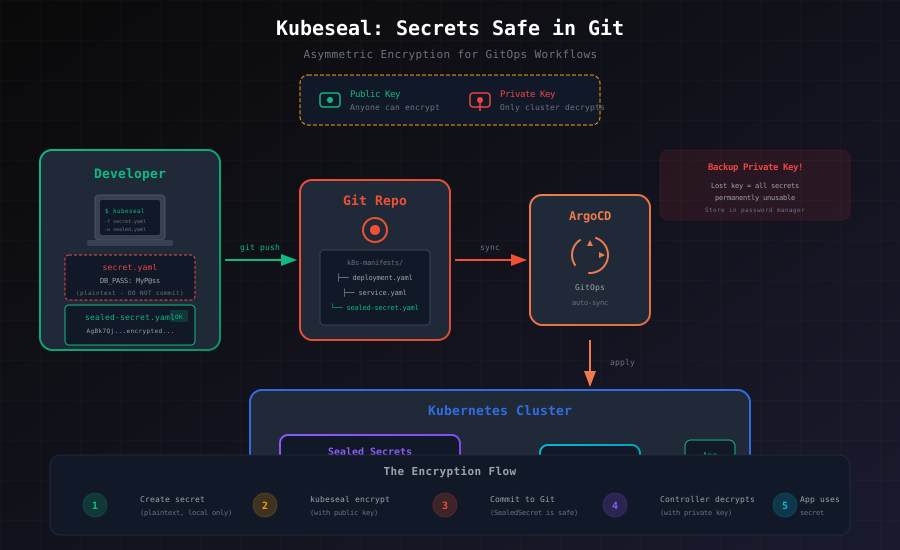
Let me paint a picture: it's 2 AM, I'm setting up ArgoCD for my homelab, feeling pretty smug about my GitOps setup. Then it hits me - I need to commit database credentials to Git. My first thought? "I'll just base64 encode them." Reader, base64 is not encryption. I learned this the hard way (okay fine, I learned it from a very concerned Reddit comment before actually making that mistake).
The Problem That Kept Me Up at Night
Here's the thing about GitOps - you want everything in Git. Your deployments, your configs, your services. It's beautiful, auditable, and reversible. But secrets? That's where things get awkward.
You have three options:
- Commit plaintext secrets (please don't)
- Use some external secret management that breaks your pure GitOps flow
- Encrypt secrets so they can live in Git safely
I went with option 3, and that's where Kubeseal enters the story.
What Kubeseal Actually Does
Kubeseal is Bitnami's solution to the "secrets in Git" problem, and the concept is elegantly simple. It uses asymmetric encryption - the same fundamental idea behind HTTPS, SSH keys, and basically everything secure on the internet.
The setup:
- A controller runs in your cluster holding a private key (like a very paranoid bouncer)
- You get a public key to encrypt secrets locally
- Anyone can encrypt, but only your cluster can decrypt
It's like having a mailbox that anyone can drop letters into, but only you have the key to open it.
My Setup Journey
Installing the Controller
I went with Helm because typing long kubectl commands at 2 AM is how mistakes happen:
helm repo add sealed-secrets https://bitnami-labs.github.io/sealed-secrets
helm install sealed-secrets sealed-secrets/sealed-secrets -n kube-system
For the purists who prefer vanilla kubectl (I respect the commitment):
kubectl apply -f https://github.com/bitnami-labs/sealed-secrets/releases/download/v0.24.0/controller.yamlInstalling the CLI
On my Linux boxes:
wget https://github.com/bitnami-labs/sealed-secrets/releases/download/v0.24.0/kubeseal-0.24.0-linux-amd64.tar.gz
tar xfz kubeseal-0.24.0-linux-amd64.tar.gz
sudo install -m 755 kubeseal /usr/local/bin/kubeseal
On macOS (because sometimes I pretend to be productive at coffee shops):
brew install kubesealA quick sanity check to make sure everything's working:
# Is the controller alive?
kubectl get pods -n kube-system | grep sealed-secrets

# Can we fetch the public key?
kubeseal --fetch-cert
If both work, you're in business. If not, well, welcome to my world of troubleshooting at odd hours.
The Actual Workflow (With Real Examples)
Let me walk you through encrypting my PostgreSQL credentials, because that's the actual use case that started this whole adventure.
Step 1: Create a Normal Secret
Start with a regular Kubernetes secret. Yes, with plaintext. Don't worry, we're not committing this:
# db-secret.yaml (DO NOT COMMIT THIS FILE)
apiVersion: v1
kind: Secret
metadata:
  name: postgres-credentials
  namespace: production
type: Opaque
stringData:
  DB_URL: "postgresql://dbuser:MyP@[email protected]:5432/mydb"
  DB_USER: "dbuser"
  DB_PASSWORD: "MyP@ssw0rd"
Step 2: Seal It
kubeseal -f db-secret.yaml -w db-sealed-secret.yamlStep 3: Admire Your Encrypted Secret
# db-sealed-secret.yaml (This one's safe to commit!)
apiVersion: bitnami.com/v1alpha1
kind: SealedSecret
metadata:
  name: postgres-credentials
  namespace: production
spec:
  encryptedData:
    DB_URL: AgBk7Qj...bunch-of-encrypted-gibberish...mQiLC
    DB_USER: AgA3K...more-encrypted-stuff...pZX==
    DB_PASSWORD: AgDfR...you-get-the-idea...7gH==
That encrypted gibberish? Completely useless without your cluster's private key. Commit it, push it, review it in PRs - it's just noise to anyone without access to your cluster.
Step 4: Deploy and Forget
kubectl apply -f db-sealed-secret.yamlThe controller sees the SealedSecret, decrypts it, and creates a regular Secret. Your applications consume it normally:
apiVersion: apps/v1
kind: Deployment
metadata:
  name: myapp
spec:
  template:
    spec:
      containers:
      - name: app
        env:
        - name: DATABASE_URL
          valueFrom:
            secretKeyRef:
              name: postgres-credentials
              key: DB_URL
The Part Where I Almost Lost Everything
Here's my confession: I initially forgot to backup my private keys.
Let me be very clear about what happens if you lose the private key: every single SealedSecret in every single Git repository you've ever encrypted becomes permanently useless. You'd have to re-encrypt everything from scratch, assuming you still have the original secret values (you did keep those somewhere, right?).
Backup Your Keys (Do This Now)
kubectl get secret -n kube-system \
  -l sealedsecrets.bitnami.com/sealed-secrets-key=active \
  -o yaml > sealed-secrets-key.yaml
That file is now the most important thing in your infrastructure. Store it:
- In a password manager (I use 1Password)
- In encrypted cloud storage (AWS Secrets Manager, etc.)
- On an encrypted USB drive in a fireproof safe (I'm only slightly kidding)
Pro tip that saved me once: test your backup. Restore it to a test namespace and verify it can actually decrypt something. Finding out your backup is corrupted when you need it is... not ideal.
Scope: How Paranoid Do You Want to Be?
Kubeseal defaults to "strict" scope, meaning a sealed secret can only be decrypted for that exact name and namespace. Change either, and decryption fails.
Strict scope (default, most secure):
kubeseal -f secret.yaml -w sealed-secret.yamlNamespace-wide (secret can be renamed within the namespace):
kubeseal --scope namespace-wide -f secret.yaml -w sealed-secret.yamlCluster-wide (use anywhere - think carefully before doing this):
kubeseal --scope cluster-wide -f secret.yaml -w sealed-secret.yamlI stick with strict scope unless I have a compelling reason. Paranoia is a feature, not a bug.
Integrating with ArgoCD
This is where things get satisfying. My GitOps repo structure:
k8s-manifests/
├── apps/
│   └── myapp/
│       ├── deployment.yaml
│       └── sealed-secret.yaml  # Encrypted, safe in Git
└── argocd/
    └── application.yaml
ArgoCD Application:
apiVersion: argoproj.io/v1alpha1
kind: Application
metadata:
  name: myapp
  namespace: argocd
spec:
  project: default
  source:
    repoURL: https://github.com/yourorg/k8s-manifests
    targetRevision: main
    path: apps/myapp
  destination:
    server: https://kubernetes.default.svc
    namespace: production
  syncPolicy:
    automated:
      prune: true
      selfHeal: true
ArgoCD syncs, the SealedSecret gets applied, the controller decrypts it, and my app gets its credentials. No manual intervention, no external secret stores to manage (well, except for that backup key).
Advanced Moves I've Actually Used
Encrypting from stdin (for the security-conscious)
No temporary files, no secrets touching disk:
echo -n "my-secret-value" | kubectl create secret generic my-secret \
  --dry-run=client --from-file=password=/dev/stdin -o yaml \
  | kubeseal -o yaml > sealed-secret.yaml
Re-encrypting after key rotation
Keys should be rotated periodically. When you do:
# Get the existing secret (from cluster, not Git)
kubectl get secret my-secret -o yaml > secret.yaml

# Re-encrypt with new key
kubeseal -f secret.yaml -w new-sealed-secret.yaml
Key rotation procedure
# Create new key
kubectl -n kube-system create secret tls sealed-secrets-key-new \
  --cert=tls.crt --key=tls.key

# Label it as active
kubectl -n kube-system label secret sealed-secrets-key-new \
  sealedsecrets.bitnami.com/sealed-secrets-key=active

# Restart controller to pick up new key
kubectl -n kube-system rollout restart deployment sealed-secrets-controller
Note: old keys are kept around so existing SealedSecrets still decrypt. But new ones will use the new key.
When Things Go Wrong (And They Will)
Secret not decrypting?
# Check controller logs first
kubectl logs -n kube-system -l app.kubernetes.io/name=sealed-secrets

# Verify SealedSecret exists
kubectl get sealedsecrets -n <namespace>

# Check if Secret was created
kubectl get secrets -n <namespace>
Common culprits:
- Namespace mismatch (strict scope gotcha)
- Controller can't reach the SealedSecret
- Key was rotated and you're using old encrypted values
Can't fetch certificate?
# Is the controller even running?
kubectl get pods -n kube-system | grep sealed-secrets

# Is the service exposed?
kubectl get svc -n kube-system | grep sealed-secrets

# Manual cert extraction (last resort)
kubectl get secret -n kube-system \
  -l sealedsecrets.bitnami.com/sealed-secrets-key=active \
  -o jsonpath='{.items[0].data.tls\.crt}' | base64 -d
My Security Checklist
After learning some lessons the hard way:
- Backup private keys immediately - Not tomorrow, not after lunch. Now.
- Test those backups - Quarterly at minimum
- Strict scope by default - Loosen only with good reason
- Rotate keys annually - Put it in your calendar
- Separate keys per environment - Dev, staging, prod should have different keys
- Document recovery procedures - Future you will thank present you
- Audit access - Use RBAC to control who can read secrets
What I Learned
GitOps and secrets don't have to be mutually exclusive. Kubeseal gives you:
- Full GitOps for everything, secrets included
- PR-based workflow for secret changes (with audit trail!)
- Encryption that only your cluster can reverse
- Peace of mind at 2 AM
Is it perfect? No. You're still managing keys, still need backups, still have to think about rotation. But compared to committing plaintext or maintaining a parallel secret management system? It's pretty elegant.
What's Next for Me
I'm exploring Vault for more dynamic secret scenarios, but for static credentials that just need to exist in the cluster? Kubeseal remains my go-to. It's simple, it works, and it lets me sleep at night (mostly).
If you're running into issues or have found better patterns, I'd love to hear about it. I'm still learning this stuff, and the Kubernetes security space moves fast.