Building a Kubernetes Event Watcher: Teaching My Cluster to Tattle on Itself
How I built a controller that watches for cluster drama (CrashLoopBackOff, OOMKilled, the usual suspects) and tattles to an LLM for automated remediation. Because apparently I want AI to fix my 3am problems.
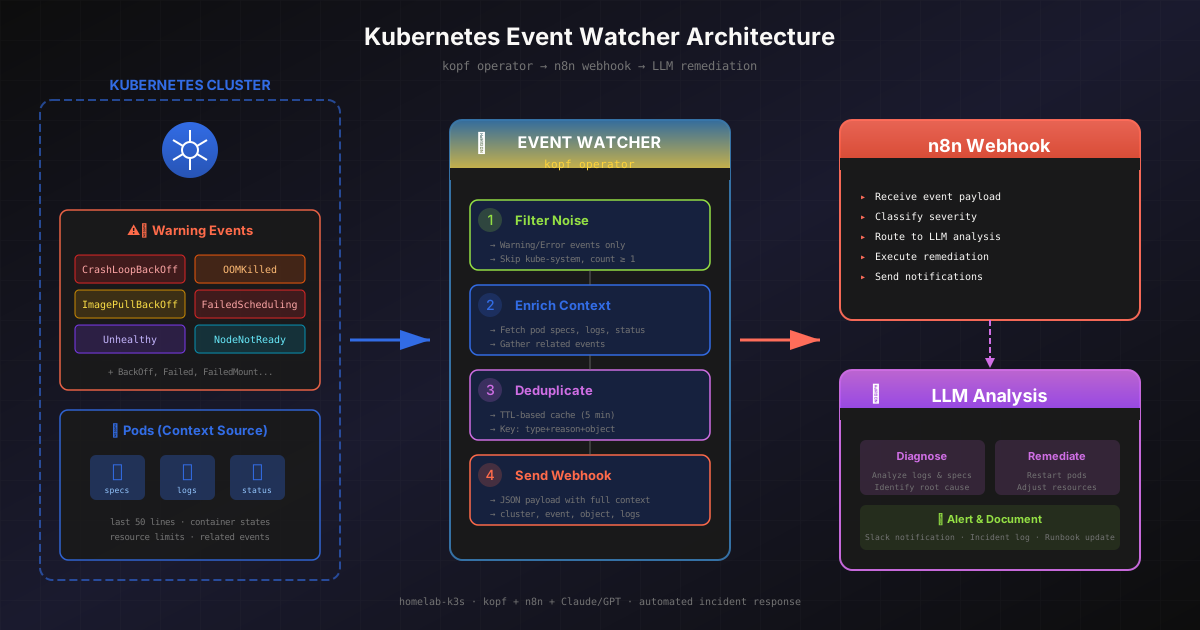
Building a Kubernetes Event Watcher: Teaching My Cluster to Tattle on Itself
Here's a recurring nightmare: it's 3am, my phone buzzes, and some pod has decided that now is the perfect time to enter a CrashLoopBackOff. I groggily SSH in, run the usual diagnostic dance (kubectl describe, kubectl logs, maybe throw in some profanity), and realize it's the same issue I fixed last month but forgot to document.
What if, I thought, the cluster could just... fix itself? Or at least try really hard before bothering me?
This is the story of how I built a Kubernetes controller that watches for cluster drama and reports it to an LLM via n8n for automated diagnosis and (hopefully) remediation. It's either the smartest thing I've built or the beginning of Skynet. Jury's still out.
The Problem: Events Are Noisy, But Some Are Screaming
Kubernetes events are like a group chat that never stops. Most of the time it's just pods saying "hey I started" or nodes announcing "I'm still here!" (good for you, node). But occasionally, buried in the noise, there's something actually important:
- CrashLoopBackOff – Your pod is stuck in an infinite loop of dying and restarting
- ImagePullBackOff – Docker Hub rate limits strike again
- OOMKilled – Someone's memory leak finally caught up with them
- FailedScheduling – No node has room for your pod (time to buy more RAM)
- Unhealthy – Readiness probes are failing
These are the events worth waking up for. The rest? Not so much.
My goal was simple: build something that watches for the bad stuff, enriches it with context (logs, pod specs, related events), and ships it off to n8n where an LLM can try to make sense of it. Maybe even fix it automatically.
Why kopf? (Or: Choosing Python Over Go For Once)
I know, I know. "Real" Kubernetes operators are written in Go. They use client-go or kubebuilder, they're blazingly fast, and they make you feel like a proper infrastructure engineer.
But here's the thing: I wanted to prototype something quickly, I wanted readable code, and I wanted to not fight with the type system at 11pm. Enter kopf – the Kubernetes Operator Pythonic Framework.
kopf lets you write operators in Python with decorators that feel almost magical:
@kopf.on.event("", "v1", "events")
def handle_event(body: kopf.Body, meta: kopf.Meta, **_):
    # This fires for every event in the cluster
    # Yes, every single one. We'll filter later.
    pass
That's it. One decorator and you're watching every event cluster-wide. kopf handles the watch streams, reconnection logic, and all the gnarly bits you don't want to think about.
The Architecture: Simple But Not Trivial
Here's what I ended up with:
┌─────────────────────────────────────────────────────────────────┐
│                     Kubernetes Cluster                           │
│                                                                   │
│   ┌─────────────┐     ┌──────────────────┐     ┌─────────────┐  │
│   │   Events    │────▶│  Event Watcher   │────▶│   n8n       │  │
│   │  (Warning,  │     │  (kopf operator) │     │  Webhook    │  │
│   │   Error)    │     │                  │     │             │  │
│   └─────────────┘     │  - Filter        │     └──────┬──────┘  │
│                       │  - Enrich        │            │         │
│   ┌─────────────┐     │  - Deduplicate   │            │         │
│   │   Pods      │────▶│  - Send          │            │         │
│   │   (logs,    │     └──────────────────┘            │         │
│   │   specs)    │                                     │         │
│   └─────────────┘                                     ▼         │
│                                              ┌─────────────────┐ │
│                                              │  LLM Analysis   │ │
│                                              │  & Remediation  │ │
│                                              └─────────────────┘ │
└─────────────────────────────────────────────────────────────────┘
The event watcher runs inside the same cluster it's monitoring (because of course it does – it needs access to the API server). It watches for events, filters out the noise, enriches the interesting ones with context, deduplicates to avoid webhook spam, and sends payloads to n8n.
Step 1: Filtering the Noise
Not all events are created equal. The first thing we need is a filter:
def should_process_event(event_type: str, reason: str, namespace: str | None, count: int) -> bool:
    """Check if this event should be processed based on filters."""
    # Only Warning and Error events (configurable)
    if event_type not in settings.event_types:
        return False

    # Specific reasons we care about
    if settings.watch_reasons and reason not in settings.watch_reasons:
        return False

    # Skip events from excluded namespaces (like kube-system)
    if namespace and namespace in settings.exclude_namespaces:
        return False

    # Ignore one-off events (they're usually transient)
    if count < settings.min_event_count:
        return False

    return True
This lets me configure exactly what I care about. Right now I'm watching for:
CrashLoopBackOffImagePullBackOffOOMKilledFailedSchedulingBackOffFailedUnhealthyFailedMountNodeNotReady
The classics, really.
Step 2: Enriching with Context
Here's where it gets interesting. An event by itself isn't that helpful. "Pod crashed" – okay, but why? The enricher fetches additional context depending on what the event is about:
class EventEnricher:
    """Fetches additional context for events."""

    def enrich(self, kind: str, name: str, namespace: str | None,
               include_logs: bool = True, log_tail_lines: int = 50) -> EventContext:
        """Fetch additional context based on the involved object."""
        context = EventContext()

        if kind == "Pod" and namespace:
            context = self._enrich_pod(name, namespace, include_logs, log_tail_lines)
        elif kind == "Deployment" and namespace:
            context = self._enrich_deployment(name, namespace)
        elif kind == "ReplicaSet" and namespace:
            context = self._enrich_replicaset(name, namespace)
        elif kind == "Node":
            context = self._enrich_node(name)

        return context
For pods specifically, we grab:
- Pod spec – What resources were requested? What image was used?
- Container statuses – What's the current state of each container?
- Recent logs – The last 50 lines (configurable) of stdout/stderr
- Related events – Other events about the same pod
This gives the LLM everything it needs to diagnose the issue. When a pod OOMs, the logs usually show the memory spike. When an image can't pull, the container status has the specific error. When scheduling fails, the related events explain why.
Step 3: Deduplication (Because Kubernetes Loves to Repeat Itself)
Events in Kubernetes have this fun property where they can fire over and over. A CrashLoopBackOff doesn't fire once – it fires every time the pod restarts. Without deduplication, your webhook endpoint would get absolutely hammered.
class EventDeduplicator:
    """Tracks seen events with TTL-based expiration."""

    def __init__(self, ttl_seconds: int = 300):
        self.ttl_seconds = ttl_seconds
        self.seen_events: dict[str, float] = {}
        self._lock = threading.Lock()

    def should_send(self, event_key: str) -> bool:
        """Check if event should be sent (not a duplicate)."""
        current_time = time.time()

        with self._lock:
            self._cleanup_expired(current_time)

            if event_key in self.seen_events:
                return False  # Already sent recently

            self.seen_events[event_key] = current_time
            return True
The dedup key combines event type, reason, and the involved object (kind, name, namespace). So if the same pod keeps crashing with the same reason, we only send one webhook every 5 minutes (configurable). Enough to know something's wrong, not enough to annoy the LLM.
Step 4: The Webhook Payload
Here's what actually gets sent to n8n:
class WebhookPayload(BaseModel):
    """Full payload sent to webhook."""
    event_uid: str
    cluster: str
    event: EventInfo
    involved_object: InvolvedObject
    context: EventContext | None
    timestamp: datetime

    def dedup_key(self) -> str:
        """Generate deduplication key."""
        return (
            f"{self.event.type}:{self.event.reason}:"
            f"{self.involved_object.kind}:{self.involved_object.namespace or ''}:"
            f"{self.involved_object.name}"
        )
The EventInfo includes the type, reason, message, count, and timestamps. The InvolvedObject tells you what resource is affected. And EventContext has all the enriched data – logs, specs, related events.
The receiving n8n workflow gets a complete picture of what's happening and can act on it intelligently.
The Deployment: GitOps All the Way
I'm using ArgoCD for everything in my homelab, so naturally this needed to be deployed via GitOps too.
RBAC: The Fun Part
To watch events cluster-wide and fetch pod specs/logs, you need some serious permissions:
apiVersion: rbac.authorization.k8s.io/v1
kind: ClusterRole
metadata:
  name: k8s-event-watcher
rules:
  - apiGroups: [""]
    resources: ["events"]
    verbs: ["get", "list", "watch"]
  - apiGroups: [""]
    resources: ["pods", "pods/log"]
    verbs: ["get", "list"]
  - apiGroups: [""]
    resources: ["nodes"]
    verbs: ["get", "list"]
  - apiGroups: ["apps"]
    resources: ["deployments", "replicasets"]
    verbs: ["get", "list"]
This gives read-only access to events, pods, logs, nodes, deployments, and replicasets. Enough to watch and enrich, not enough to break anything.
Security Hardening
Because I don't trust myself:
securityContext:
  readOnlyRootFilesystem: true
  runAsNonRoot: true
  runAsUser: 1000
  allowPrivilegeEscalation: false
  capabilities:
    drop:
      - ALL
The container runs as a non-root user with a read-only filesystem. No capabilities, no privilege escalation. If something compromises this pod, it can't do much damage.
Configuration via ConfigMap
apiVersion: v1
kind: ConfigMap
metadata:
  name: k8s-event-watcher-config
data:
  EVENT_WATCHER_WEBHOOK_URL: "http://n8n.n8n.svc.cluster.local:5678/webhook/alert"
  EVENT_WATCHER_CLUSTER_NAME: "homelab-k3s"
  EVENT_WATCHER_DEDUP_TTL_SECONDS: "300"
  EVENT_WATCHER_MIN_EVENT_COUNT: "1"
  EVENT_WATCHER_INCLUDE_LOGS: "true"
  EVENT_WATCHER_LOG_TAIL_LINES: "50"
Note the internal service URL for n8n. Initially I tried using the external domain (n8n.geekery.work), but DNS resolution was flaky from inside the cluster. Using the internal Kubernetes service (n8n.n8n.svc.cluster.local) is more reliable and faster.
The Dockerfile: Learning From My Mistakes
Building this Docker image taught me a few things (the hard way):
FROM python:3.12-slim

# Create non-root user FIRST
RUN useradd -u 1000 -m -s /bin/bash appuser

WORKDIR /app

# Install dependencies
COPY pyproject.toml .
RUN pip install --no-cache-dir .

# Copy source code and set permissions
COPY src/ src/
RUN chmod -R 755 /app && \
    chown -R appuser:appuser /app

# Add /app to PYTHONPATH so src module can be imported
ENV PYTHONPATH=/app

# Run as non-root user
USER appuser

# Run kopf operator
CMD ["kopf", "run", "--standalone", "--liveness=http://0.0.0.0:8080/healthz", "src/main.py"]
The key lessons:
- Create the user early and give it proper shell access (kopf needs
getpwuidto work) - Set
PYTHONPATHexplicitly for Python to find your modules - Use
--standalonemode so kopf doesn't try to use peering (not needed for single-instance operators) - The
--livenessflag enables the health endpoint for k8s probes
What Actually Happens When Something Goes Wrong
Let me trace through a real scenario. A pod runs out of memory:
- Kubelet notices – Container exits with OOMKilled status
- Kubelet creates event – Posts to API server: "Pod killed due to OOM"
- kopf watch triggers – Our handler receives the event
- Filter passes – Type is Warning, reason is OOMKilled
- Enricher runs – Fetches pod spec, container statuses, last 50 log lines
- Dedup check – Haven't seen this recently, proceed
- Webhook fires – Full payload goes to n8n
The n8n workflow receives:
{
  "cluster": "homelab-k3s",
  "event": {
    "type": "Warning",
    "reason": "OOMKilled",
    "message": "Container app was OOM killed",
    "count": 3
  },
  "involved_object": {
    "kind": "Pod",
    "name": "my-app-xyz123",
    "namespace": "production"
  },
  "context": {
    "pod_spec": { /* full spec */ },
    "container_statuses": [ /* current state */ ],
    "recent_logs": "... last 50 lines showing memory growth ...",
    "related_events": [ /* other events about this pod */ ]
  }
}
Now an LLM can look at this and potentially:
- Identify what's consuming memory from the logs
- Check if resource limits are too low
- Suggest (or apply) a fix
- At minimum, create a detailed incident report
What's Next: The n8n Workflow
I'm still building out the n8n side, but the plan is:
- Receive webhook – Parse the event payload
- Classify severity – Some things need immediate action, others can wait
- LLM analysis – Send context to Claude/GPT, ask for diagnosis
- Automated remediation (if confident):
- Restart pod for transient failures
- Scale up replicas if one is struggling
- Patch resource limits if obviously wrong
- Notification – Slack/email with diagnosis and actions taken
- Documentation – Log the incident for future reference
The beauty is that n8n can orchestrate all of this visually. And if the LLM isn't confident about a fix, it can just alert me with a detailed diagnosis rather than taking action.
Lessons Learned
1. Internal service URLs are your friend
External DNS from inside pods is sketchy. Use servicename.namespace.svc.cluster.local whenever possible.
2. Deduplication is non-negotiable Kubernetes events are noisy. Without dedup, you'll spam your webhook endpoint into oblivion.
3. Context is everything An event without context is nearly useless. The enricher makes the difference between "something crashed" and "here's exactly what happened and why."
4. kopf is surprisingly capable For a Python framework, it handles watch streams, reconnection, and health checks really well. The decorator syntax makes the code readable.
5. Start with read-only permissions This controller only watches and reports. It can't break anything even if it goes haywire. That's intentional.
Is This Overkill?
Probably. For a homelab with a handful of services, I could just check alerts when they come in.
But here's the thing: building this taught me more about Kubernetes internals, event-driven architecture, and operator patterns than any tutorial could. And when I eventually have an LLM that can actually fix my 3am problems? That'll be worth it.
In the meantime, at least I'll have detailed diagnostics waiting for me when something breaks. Progress.
Update: It Actually Works Now (And Got a UI)
A few iterations later...
Remember when I said "I'm still building out the n8n side"? Well, I built it. And then I kept building. Because apparently I can't leave well enough alone.
The event watcher now has:
- A web UI for configuration (no more editing YAML at midnight)
- PostgreSQL persistence (events don't disappear into the void anymore)
- Two actual n8n workflows that do the LLM analysis and remediation thing
Let me walk you through the upgrades, because this is where it actually got useful.
The Web UI: Because YAML Is Not a User Interface
Here's a confession: I got tired of SSH-ing into the cluster to change which namespaces were being monitored. Every. Single. Time. So I did what any reasonable engineer would do in the age of AI – I spent 5 minutes building a UI with Claude Code instead of editing ConfigMaps forever.
This is where tools like Claude Code have completely changed the game. What used to take hours of boilerplate-writing, debugging CORS issues, and fighting with build configs now happens in minutes. Claude Code has amplified my productivity to the point where building entire UIs, writing comprehensive tests, and rapidly prototyping new products feels almost effortless. The ability to build quickly, fail fast, iterate, and test thoroughly means I can focus on the creative problem-solving rather than the mechanical typing. It's not about replacing thinking – it's about accelerating execution so you can test more ideas and learn faster.
The frontend is built with Svelte (SvelteKit specifically) and served directly from the same container as the API. FastAPI handles the backend, and the whole thing is surprisingly snappy.
The Settings Page
The killer feature is the Settings page. Instead of defining namespaces in environment variables, you now get a nice checkbox list:
How it works:
- Monitored namespaces: Select which namespaces to watch. Nothing is monitored until you explicitly select at least one namespace. This was a deliberate design choice – I don't want to wake up to 500 alerts from
kube-systembecause I forgot to exclude it. - Excluded namespaces: For the ones you want to pretend don't exist.
- Event types: Toggle between Warning and Normal (spoiler: you probably only care about Warning).
The configuration gets stored in PostgreSQL and refreshes every 30 seconds. No restarts required.
# The config refresh loop
async def refresh_db_config():
    """Refresh configuration from database every 30 seconds."""
    global _db_config_cache
    while True:
        try:
            config_repo = ConfigRepository()
            _db_config_cache["monitored_namespaces"] = await config_repo.get_monitored_namespaces()
            _db_config_cache["excluded_namespaces"] = await config_repo.get_excluded_namespaces()
            _db_config_cache["event_types"] = await config_repo.get_event_types()
            _db_config_cache["last_refresh"] = datetime.now()
        except Exception as e:
            logger.error(f"Failed to refresh config: {e}")
        await asyncio.sleep(30)
PostgreSQL: Because Events Are History
Kubernetes events expire after about an hour. That's great for keeping etcd small, but terrible for post-mortems. "What happened last Tuesday at 3am?" becomes an unanswerable question.
Now every event that passes our filters gets persisted to PostgreSQL with full context. The schema is straightforward:
CREATE TABLE events (
    id SERIAL PRIMARY KEY,
    event_uid VARCHAR(255) UNIQUE NOT NULL,
    cluster VARCHAR(100) NOT NULL,
    namespace VARCHAR(255),
    name VARCHAR(255),
    kind VARCHAR(100),
    event_type VARCHAR(50),
    reason VARCHAR(100),
    message TEXT,
    count INTEGER DEFAULT 1,
    first_timestamp TIMESTAMPTZ,
    last_timestamp TIMESTAMPTZ,
    context JSONB,
    created_at TIMESTAMPTZ DEFAULT NOW()
);
That context JSONB column is where all the good stuff lives – pod specs, logs, related events. Full forensics for every incident.
The API
The FastAPI backend exposes everything you'd expect:
| Endpoint | Method | What it does |
|---|---|---|
/api/events | GET | List events with filtering |
/api/events/{id} | GET | Get single event with full context |
/api/config | GET | Current monitoring configuration |
/api/config/namespaces | PUT | Update namespace settings |
/api/config/event-types | PUT | Update event type settings |
/api/namespaces | GET | List all cluster namespaces |
/api/queue | GET | View webhook delivery queue |
The queue endpoint is particularly useful for debugging. If webhooks are failing (rate limits, network issues, n8n being n8n), you can see what's backed up.
The n8n Workflows: Where the Magic Happens
Okay, this is the fun part. I have two workflows that work together:
Workflow 1: Alert Analysis
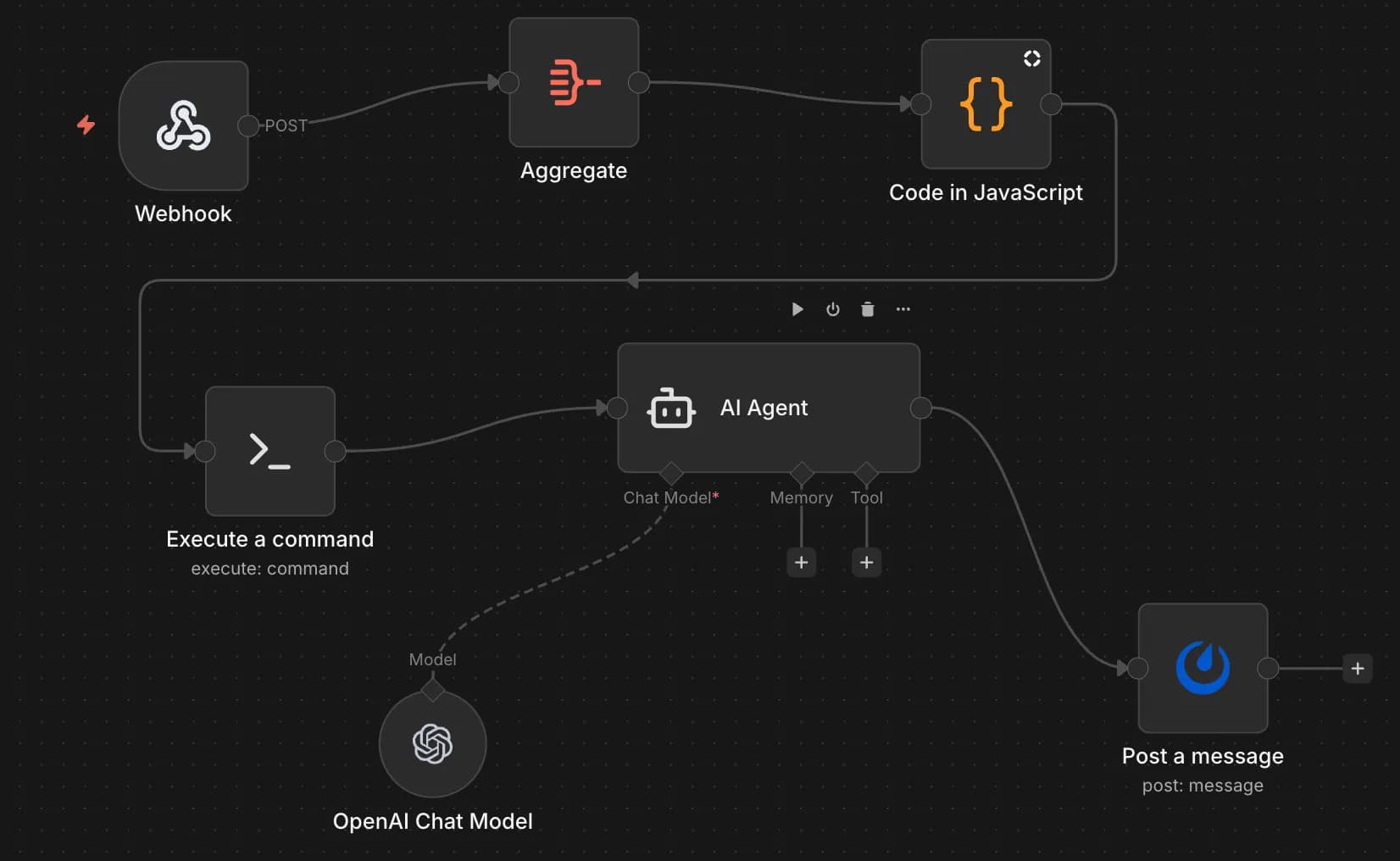
This is the "something went wrong, let's figure out what" workflow:
- Webhook – Receives the event payload from k8s-event-watcher
- Aggregate – Batches events if multiple arrive in quick succession (because
ImagePullBackOfftends to come in threes) - Code in JavaScript – Formats the event into a prompt for the AI
- Execute a command – Runs diagnostic commands if needed (kubectl describe, etc.)
- AI Agent (OpenAI) – Analyzes the event with full context and suggests what to do
- Post a message – Sends the diagnosis to Discord (because Slack is for work)
The AI prompt includes the event details, pod specs, recent logs, and asks:
- What likely caused this?
- Is this a transient issue or something that needs fixing?
- If fixable, what's the recommended action?
Workflow 2: Fix Execution
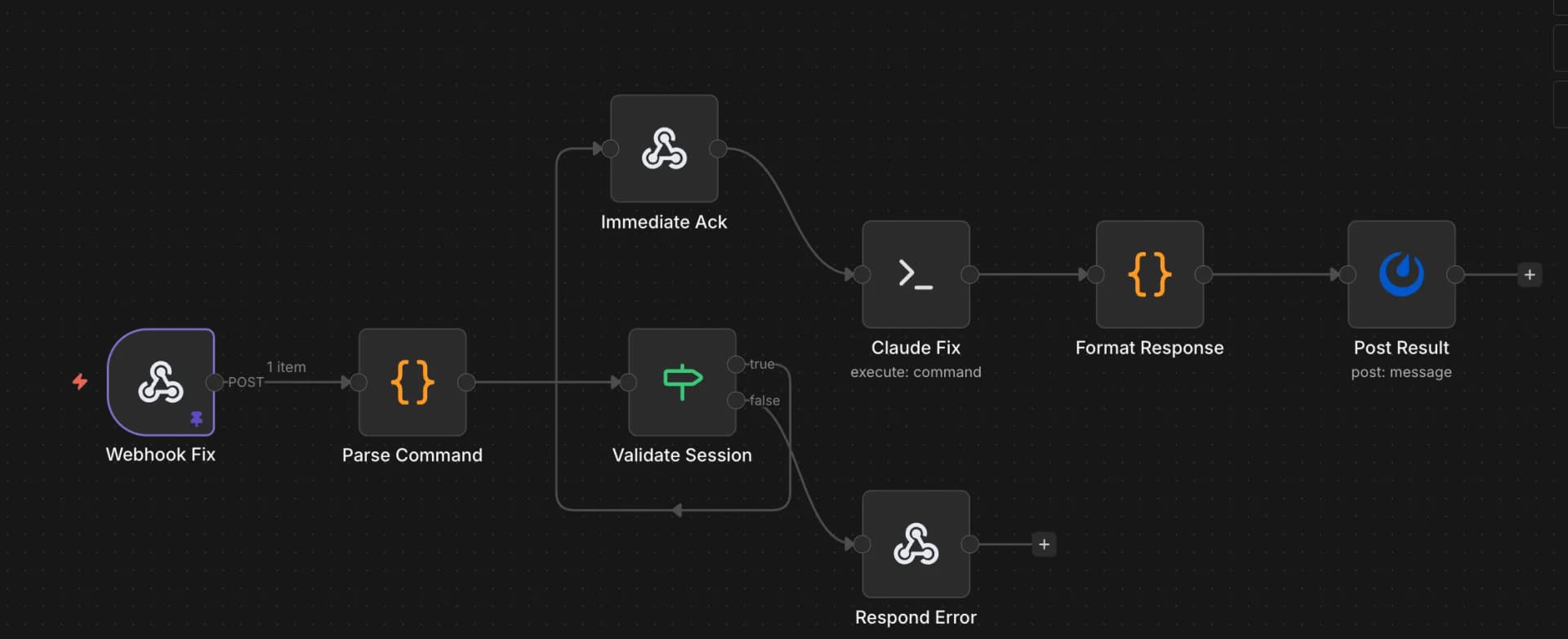
This is the "okay, actually fix it" workflow. It's more careful because, you know, it can actually change things:
- Webhook Fix – Receives fix requests (from Discord commands, scheduled triggers, or manual invocation)
- Parse Command – Extracts what needs to be done
- Validate Session – Checks that the request is authorized (I'm not letting random webhooks delete my pods)
- Immediate Ack – Sends a quick "working on it" response
- Claude Fix – Executes the actual remediation command via SSH/kubectl
- Format Response – Structures the result nicely
- Post Result – Reports what happened (success, failure, "I tried but here's what went wrong")
The validation step is crucial. The fix workflow has actual write permissions, so it needs to verify that:
- The request came from an authorized source
- The action is within acceptable bounds (no
kubectl delete namespace production) - There's an audit trail
Putting It All Together
Here's what actually happens now when something breaks:
- Pod in
hertziannamespace starts failing withImagePullBackOff - k8s-event-watcher catches it, enriches with context, saves to PostgreSQL
- Webhook fires to n8n Alert workflow
- AI Agent analyzes: "Image
postgres:bad-tagdoesn't exist. Typo in deployment spec. Fix by updating image tag to valid version." - Discord notification: "🔴 ImagePullBackOff in hertzian/test-pod. Likely typo in image tag. Suggested fix:
kubectl set image deployment/test-pod test-pod=postgres:15" - I reply with
/fix approve(or it auto-executes if I'm feeling brave) - Fix workflow runs the command, reports success
- Pod starts working
Is it perfect? No. Does the AI sometimes hallucinate fixes that would make things worse? Also yes (which is why there's an approval step). But for the common issues – typos, transient failures, resource limits that need bumping – it's genuinely useful.
What I Learned (Part 2)
1. async PostgreSQL is trickier than it looks asyncpg needs explicit JSON codec setup or it returns JSONB columns as strings. Spent an embarrassing amount of time debugging "why does it say 2 selected when I picked 0."
2. Pydantic models save lives FastAPI query parameters and JSON bodies look similar but aren't. Use explicit Pydantic models for anything non-trivial. Future you will thank present you.
3. Default to doing nothing
The watcher now monitors nothing until you explicitly configure namespaces. This seems obvious in retrospect, but my first version watched everything and I got 400 alerts in 10 minutes from kube-system. Lesson learned.
4. n8n is more capable than it looks The visual workflow builder is nice for simple stuff, but it can also run complex multi-step processes with branching, error handling, and AI integration. Underrated tool.
5. Always have an approval step for destructive actions Letting AI auto-fix things sounds great until it decides the fix for "pod crashing" is "delete the deployment." Human-in-the-loop for anything that writes.
The Code
The project is open source if you want to set up something similar:
- k8s-event-watcher – The full system with UI, API, and watcher
- Dockerfile, manifests, and migrations included
- Works with any webhook endpoint, not just n8n
The patterns here – event-driven monitoring, context enrichment, LLM-powered analysis, human-approved remediation – are applicable beyond Kubernetes. It's basically an incident response pipeline with AI in the loop.
Is it overkill for a homelab? Absolutely. Did I learn a ton building it? Also absolutely. And sometimes, that's the whole point.
Now if you'll excuse me, I need to go approve an AI-suggested fix for a pod that's been OOMKilled. At least I don't have to SSH in this time.