From kubectl apply to Sleep: How GitOps Transformed My Homelab
A beginner's journey building a production-grade GitOps pipeline with ArgoCD, and the lessons that translate to real-world infrastructure
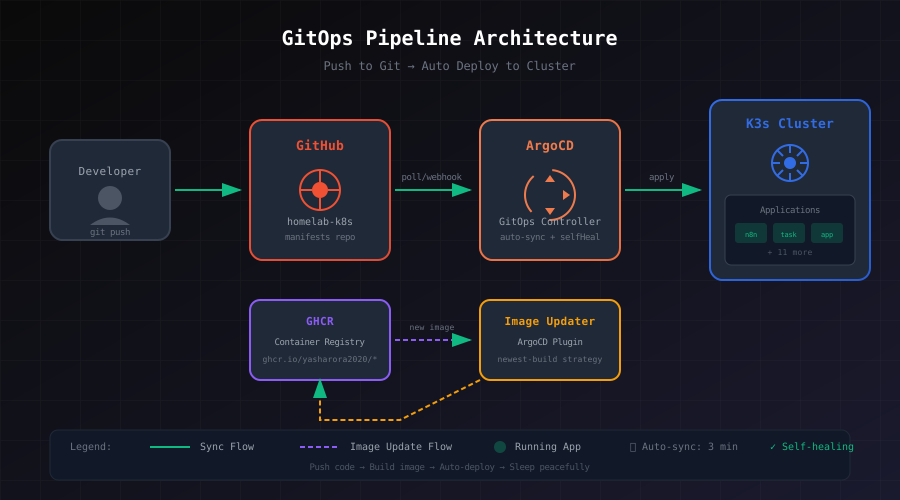
It was 2 AM, and I was SSH'd into my cluster, running kubectl apply -f deployment.yaml for the third time that night. Something was broken. I wasn't sure what I'd changed. My terminal history was a graveyard of half-remembered commands, and my "quick fix" from last week had apparently broken something else entirely.
Sound familiar?
Let me paint you the full picture of my evolution as a "Kubernetes administrator" (generous term):
Stage 1: The SSH Era — I'd SSH into the master node, edit YAML files with nano (yes, nano), and run kubectl apply while holding my breath. Deploying felt like defusing a bomb. Every. Single. Time.
Stage 2: The "Wait, There's a Kubeconfig?" Era — Mind. Blown. You mean I don't have to SSH? I can just... run kubectl from my laptop? I spent a whole weekend setting up kubeconfig contexts like I'd discovered fire. Suddenly I could switch between clusters with kubectl config use-context homelab like some kind of wizard. (I may have shown this to my non-tech friends. They were not impressed.)
Stage 3: The "This Still Feels Wrong" Era — Sure, I wasn't SSH'ing anymore, but I was still running kubectl apply manually. Still forgetting what I'd deployed. Still waking up to broken services with no idea what changed.
That's when I discovered GitOps, and everything clicked.
This is the story of how I went from that chaos to a setup where I push code, go to sleep, and wake up to find everything deployed correctly. No SSH. No manual kubectl apply. Just Git.
(And yes, I'm still a beginner figuring this out. But that's kind of the point.)
The Problem with "Just SSH In"
Before GitOps, my deployment workflow looked like this:
- SSH into the cluster
- Run
kubectl apply -f something.yaml - Realize I forgot to update the image tag
- Edit the file directly on the server (because who has time to push to Git?)
- Run
kubectl applyagain - Wonder why things are broken three weeks later
- Have no idea what the "correct" state should be
The cluster was a mystery box. I'd make changes, forget about them, then spend hours debugging issues caused by drift between what I thought was deployed and what was actually running.
The breaking point came when I accidentally deleted a ConfigMap that I had no record of. It existed only in the cluster. No backup. No Git history. Just... gone.
That's when I discovered GitOps.
What is GitOps? (The Simple Version)
GitOps boils down to one rule: Git is the single source of truth.
Instead of you telling the cluster what to do (kubectl apply), the cluster watches Git and applies changes itself. You describe what you want (declarative), push it to Git, and something else makes it happen.
You → Push to Git → GitOps Controller → Applies to Cluster
The magic is that the cluster continuously reconciles. If someone (me, at 2 AM) manually changes something, the controller notices the drift and reverts it back to what Git says.
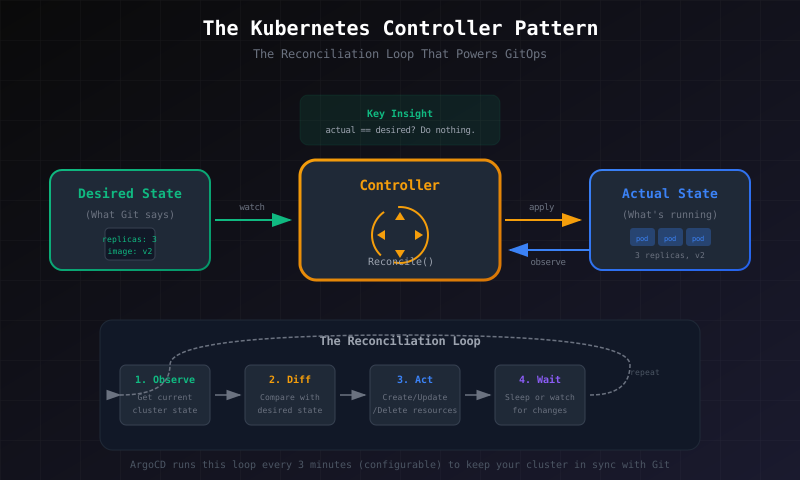
This is the Kubernetes controller pattern in a nutshell: observe the current state, compare it to the desired state, take action if they differ, repeat forever. Every controller in Kubernetes (Deployments, ReplicaSets, Services) works this way. ArgoCD is just another controller that happens to read its desired state from Git.
This isn't some bleeding-edge startup practice. Netflix, Spotify, and banks deploy this way. It's battle-tested. And surprisingly, it's not that hard to set up.
My Stack (And Why I Chose It)
Here's what I'm running on my homelab:
| Component | What I Use | Why |
|---|---|---|
| Cluster | K3s (3-node HA) | Lightweight, runs on my mini PCs |
| GitOps Controller | ArgoCD | Great UI, easy to debug |
| Image Updates | ArgoCD Image Updater | Auto-deploys new container builds |
| Secrets | Bitnami Sealed Secrets | Encrypt secrets in Git safely |
| Ingress | Traefik + Let's Encrypt | Free TLS, works out of the box |
| Storage | Longhorn | Distributed storage across nodes |
| External Access | Cloudflare Tunnel + Tailscale | Zero exposed IPs |
Is this overkill for a homelab? Probably. But it taught me more about production Kubernetes than any tutorial ever did.
The Repository Structure
Everything lives in one Git repository. Here's what it looks like:
homelab-k8s/
├── applications/           # ArgoCD Application definitions
│   ├── taskflow.yaml
│   ├── thinkwiser.yaml
│   └── n8n.yaml
├── taskflow/               # Actual Kubernetes manifests
│   ├── namespace.yaml
│   ├── deployment.yaml
│   ├── service.yaml
│   ├── ingress.yaml
│   ├── hpa.yaml
│   ├── sealed-secret.yaml
│   └── kustomization.yaml
├── thinkwiser/
│   └── ...
└── n8n/
    └── ...
The applications/ directory tells ArgoCD what to deploy. Each app directory contains the actual Kubernetes manifests. Simple, predictable, and easy to navigate.
A Real Example: Deploying Taskflow
Let me walk you through how I deployed Taskflow, a task management app I built. This is a real deployment from my cluster.
Step 1: The ArgoCD Application
First, I create an ArgoCD Application that tells the cluster where to find the manifests:
# applications/taskflow.yaml
apiVersion: argoproj.io/v1alpha1
kind: Application
metadata:
  name: taskflow
  namespace: argocd
  annotations:
    # Auto-update when new images are pushed
    argocd-image-updater.argoproj.io/image-list: taskflow=ghcr.io/yasharora2020/taskflow
    argocd-image-updater.argoproj.io/taskflow.update-strategy: latest
    argocd-image-updater.argoproj.io/write-back-method: git:secret:argocd/github-token
spec:
  project: default
  source:
    repoURL: [email protected]:Yasharora2020/homelab-k8s.git
    targetRevision: main
    path: taskflow
  destination:
    server: https://kubernetes.default.svc
    namespace: taskflow
  syncPolicy:
    automated:
      prune: true      # Delete resources removed from Git
      selfHeal: true   # Revert manual changes
    syncOptions:
      - CreateNamespace=true
    retry:
      limit: 5
      backoff:
        duration: 5s
        factor: 2
        maxDuration: 3m
The key bits:
automated.prune: If I delete a file from Git, the resource gets deleted from the clusterautomated.selfHeal: If someone manually changes something, ArgoCD reverts itretry: If something fails, it retries with exponential backoff (because networks are flaky)
Step 2: The Deployment
The actual deployment includes security best practices I learned the hard way:
# taskflow/deployment.yaml
apiVersion: apps/v1
kind: Deployment
metadata:
  name: taskflow
  namespace: taskflow
spec:
  replicas: 1
  selector:
    matchLabels:
      app: taskflow
  template:
    metadata:
      labels:
        app: taskflow
    spec:
      # Don't run as root (learned this after a security scare)
      securityContext:
        runAsNonRoot: true
        runAsUser: 1001
        fsGroup: 1001

      containers:
        - name: taskflow
          image: ghcr.io/yasharora2020/taskflow:v0.1.0
          ports:
            - containerPort: 3000

          # Resource limits prevent one app from eating the cluster
          resources:
            requests:
              cpu: 100m
              memory: 128Mi
            limits:
              cpu: 250m
              memory: 256Mi

          # Health checks - Kubernetes restarts unhealthy pods
          livenessProbe:
            httpGet:
              path: /api/health
              port: 3000
            initialDelaySeconds: 40
            periodSeconds: 30

          readinessProbe:
            httpGet:
              path: /api/health
              port: 3000
            initialDelaySeconds: 20
            periodSeconds: 10

          # Graceful shutdown - finish requests before dying
          lifecycle:
            preStop:
              exec:
                command: ["/bin/sh", "-c", "sleep 15"]

      imagePullSecrets:
        - name: ghcr-secret

      terminationGracePeriodSeconds: 30
Every one of these settings exists because I broke something without it. The preStop sleep? That's because my app was getting killed mid-request during deployments. The runAsNonRoot? That came after I read about container escape vulnerabilities.
Step 3: The Magic of Image Updater
Here's where it gets interesting. When I push new code to my app repository, GitHub Actions builds a new container image and pushes it to GHCR. Then:
- ArgoCD Image Updater notices the new image
- It updates
kustomization.yamlwith the new tag - It commits that change back to Git
- ArgoCD sees the Git change and syncs
The result? I push app code, and within 3 minutes, it's running in production. No manual intervention. No kubectl. Just Git commits all the way down.
# taskflow/kustomization.yaml (auto-updated by Image Updater)
apiVersion: kustomize.config.k8s.io/v1beta1
kind: Kustomization
resources:
  - namespace.yaml
  - deployment.yaml
  - service.yaml
  - ingress.yaml
  - sealed-secret.yaml
images:
  - name: ghcr.io/yasharora2020/taskflow
    newTag: v0.1.0  # This gets updated automatically
Exposing Services: The Cloudflare + Tailscale Story
One problem with a homelab: how do you access it from outside without exposing your home IP to the internet?
My first instinct was to forward ports on my router. Bad idea. You're essentially putting a "hack me" sign on your public IP. Then I thought about a traditional VPN server, but that's another thing to maintain and secure.
I ended up with two complementary solutions that solve different problems:
Tailscale for Personal/Admin Access
Tailscale creates a mesh VPN using WireGuard under the hood. I have it running in a lightweight LXC container on my Proxmox cluster (512MB RAM—it's tiny), and any device on my Tailscale network can access the cluster as if it were on my local network.
My Laptop (anywhere) → Tailscale Network → Homelab (192.168.70.x)
No port forwarding. No firewall rules. No dynamic DNS. It just works.
The setup was almost embarrassingly simple:
- Install Tailscale in an LXC container
- Run
tailscale up - Authenticate via browser
- Enable subnet routing to expose my homelab network
Now when I'm debugging at a coffee shop, I can kubectl get pods like I'm sitting at home. My kubeconfig just points to the internal IP, and Tailscale handles the routing.
The real win? When something breaks at 2 AM (and it will), I can pull out my phone, VPN in via Tailscale, and check ArgoCD's UI without getting out of bed. (Not that I'm proud of this workflow, but it's saved me a few times.)
Cloudflare Tunnel for Public Access
Tailscale is great for me, but what about apps I want publicly accessible? My learning platform needs to be reachable by anyone, not just devices on my Tailscale network.
Enter Cloudflare Tunnels. The architecture is elegant:
Internet → Cloudflare CDN → Cloudflare Tunnel → cloudflared pods → Traefik → App
The key insight: no cluster IP is ever exposed to the internet. The cloudflared pods make outbound connections to Cloudflare's edge network. All inbound traffic comes through Cloudflare, which means:
- DDoS protection (free tier includes basic protection)
- WAF rules if I want them
- Free SSL certificates
- My home IP stays private
- No ports open on my router
I run 3 replicas of cloudflared with pod anti-affinity, so they spread across my 3 nodes. If one node goes down, the tunnel stays up.
# cloudflared/configmap.yaml
tunnel: homelab
ingress:
  - hostname: hertzian.geekery.work
    service: http://traefik.traefik:80
  - hostname: taskflow.geekery.work
    service: http://traefik.traefik:80
  - service: http_status:404  # Fallback for unknown hosts
Adding a new public service is just a YAML edit. Update the ConfigMap, push to Git, wait 3 minutes. ArgoCD syncs the change, the pods restart with the new config, and Cloudflare routes traffic to the new hostname. Zero touch.
The DNS Propagation War Story
The first time I set this up, I spent 4 hours debugging why my tunnel wasn't working. I checked the cloudflared logs (fine), verified the tunnel was connected in Cloudflare's dashboard (showed "Healthy"), tested the internal routing (worked), and ran out of ideas.
Turned out the DNS CNAME record I created was still propagating. Cloudflare's dashboard even showed it as active, but some DNS resolvers hadn't picked it up yet.
The lesson: sometimes you just need to wait. And maybe use dig with different DNS servers before panic-debugging.
# Check DNS from different resolvers
dig rf-learning.geekery.work @1.1.1.1
dig rf-learning.geekery.work @8.8.8.8
Now I always check DNS propagation before assuming something's broken.
Secrets Without the Stress
Secrets are tricky. You can't commit them to Git in plaintext, but you also don't want to manage them separately from your GitOps workflow.
I use Bitnami Sealed Secrets. The workflow:
# Create a regular secret
kubectl create secret generic taskflow-secrets \
  --from-literal=DATABASE_URL='postgres://...' \
  --dry-run=client -o yaml > /tmp/secret.yaml

# Seal it (encrypts with the cluster's public key)
kubeseal --format yaml < /tmp/secret.yaml > taskflow/sealed-secret.yaml

# Delete the plaintext immediately
rm /tmp/secret.yaml

# Commit the sealed secret to Git
git add taskflow/sealed-secret.yaml
git commit -m "Add taskflow secrets"
git push
The sealed secret is safe to commit. Only the Sealed Secrets controller running in my cluster can decrypt it. Even if someone gets my Git repo, they can't read the secrets.
One gotcha: sealed secrets are namespace-scoped. A secret sealed for the taskflow namespace can't be used in n8n. This tripped me up initially, but it's actually a good security boundary.
When Things Break
Things will break. Here's my debugging workflow:
1. Check ArgoCD First
kubectl get application taskflow -n argocdIf it says "OutOfSync" or "Degraded", ArgoCD knows something's wrong. The UI at argocd.geekery.work shows exactly what's different between Git and the cluster.
2. Check the Events
kubectl get events -n taskflow --sort-by='.lastTimestamp'Events tell you what Kubernetes tried to do and why it failed.
3. Check the Logs
kubectl logs -n taskflow -l app=taskflow --tail=100Common Failures I've Hit
ImagePullBackOff: Usually means the imagePullSecret is missing or wrong. Check that ghcr-secret exists in the namespace.
CrashLoopBackOff: The container starts and immediately crashes. Check logs for missing environment variables or failed database connections.
502 Bad Gateway: The pod is running but the readiness probe is failing. Check that your health endpoint actually works.
The beautiful thing about GitOps: if I'm debugging at 2 AM and I kubectl edit something in frustration, ArgoCD shows it as "OutOfSync" and will revert it within 3 minutes. Drunk-me can't permanently break the cluster.
What I'd Do Differently
If I were starting over:
-
Start with one app. I tried to migrate everything at once and spent weeks debugging issues that would have been obvious one at a time.
-
Set up monitoring earlier. When something breaks, you want Prometheus and Grafana already running, not trying to deploy them during an outage.
-
Test sealed secrets rotation. I still haven't properly tested what happens when the Sealed Secrets key rotates. That's on my todo list.
-
Don't over-engineer early. I set up HPA (Horizontal Pod Autoscaler) before my apps had any real traffic. It added complexity for zero benefit.
The Production Principles
Here's what my homelab taught me that translates directly to production:
| Homelab Lesson | Production Application |
|---|---|
| Git = source of truth | Audit trail, compliance, instant rollbacks |
| Auto-sync + self-heal | Reduced mean time to recovery, drift prevention |
| Declarative manifests | Reproducible environments across dev/staging/prod |
| Sealed secrets | Never plain secrets in Git, principle of least privilege |
| Health probes | Zero-downtime deployments, automatic recovery |
| Resource limits | Predictable scheduling, cost control |
These aren't "homelab best practices." They're just best practices. The homelab is where I learned them without production pressure.
Getting Started
If you want to try this yourself, here's the minimal path:
-
Install ArgoCD in your cluster:
kubectl create namespace argocd kubectl apply -n argocd -f https://raw.githubusercontent.com/argoproj/argo-cd/stable/manifests/install.yaml -
Create one Application pointing to a Git repo with a simple deployment
-
Push a change and watch ArgoCD sync it
-
Break something on purpose (edit the deployment with
kubectl edit) and watch ArgoCD fix it
That's it. Start small. Add complexity when you need it.
The Learning-by-Doing Philosophy
I want to be honest: I didn't learn GitOps by reading documentation. I learned it by breaking my cluster repeatedly and figuring out how to fix it.
The first time I enabled selfHeal, I didn't understand what it did. I edited a deployment manually, and 3 minutes later my changes vanished. I thought ArgoCD was broken. Nope—it was working exactly as designed. I just hadn't read the docs.
The first time I sealed a secret for the wrong namespace, I spent an hour wondering why my pod couldn't read environment variables. The error message wasn't obvious. I had to kubectl describe the pod, find the "secret not found" event, realize the secret did exist but in a different namespace, and then learn that sealed secrets are namespace-scoped.
Every one of these mistakes taught me something that tutorials never did. The homelab is a safe place to fail. Nothing's on fire (except metaphorically), no customers are affected, and I can take my time understanding why something broke.
This is why I think every developer should have a homelab, even a small one. It's not about having cool hardware in your closet. It's about having a sandbox where you can learn infrastructure without consequences.
What I'm Still Figuring Out
This isn't a "I've mastered GitOps" post. There's plenty I haven't figured out:
-
Multi-environment deployments: Right now everything goes to "production" (my homelab). I want to set up a staging environment that deploys first, but I haven't worked out the promotion workflow yet.
-
Secrets rotation: Sealed Secrets work great, but what happens when I need to rotate the encryption key? I've read the docs but haven't tested it in practice.
-
Disaster recovery: I have backups (Velero for the cluster, separate scripts for the VMs and database), but I haven't done a full "nuke everything and restore" test. That's on my list.
-
Cost optimization: My cluster runs 24/7 on three mini PCs. It's fine for a homelab, but if this were cloud infrastructure, I'd be paying for idle resources. I want to explore scaling to zero for apps that don't need to be always-on.
If you've solved any of these, I'd genuinely love to hear how.
Closing Thoughts
The best infrastructure is infrastructure you can trust to do the right thing while you sleep. Before GitOps, my cluster was a black box. I'd make changes and hope they stuck. Now, Git tells me exactly what's deployed, ArgoCD keeps it that way, and I can actually sleep at night.
I'm still learning. I still break things. But now when I break things, I can look at Git history and see exactly what changed. And more often than not, the fix is just a git revert away.
If you're running a homelab and still SSH'ing in to deploy changes, give GitOps a try. Your future self will thank you.
This setup is running in my homelab right now. I wrote this post partly to document what I've learned, and partly because writing forces me to actually understand what I'm doing (instead of just copying YAML from Stack Overflow).
If you have questions, suggestions, or want to tell me I'm doing something completely wrong—I'm all ears. The best way to learn is from people who've already made the mistakes I'm about to make.