Kubernetes Security Auditing: From kube-bench Findings to Pod Security Standards
Running a security audit on my Kubernetes cluster revealed some uncomfortable truths. Here is what I learned about CIS Benchmarks, Pod Security Standards, and why your kubeconfig is probably world-readable too.
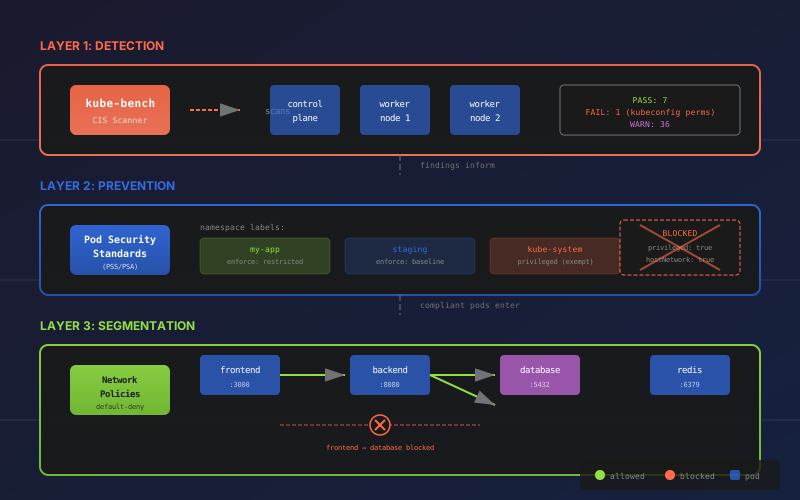
I thought my Kubernetes cluster was reasonably secure. I had TLS everywhere, secrets were encrypted, and I even felt a little smug about my GitOps setup. Then I ran kube-bench.
Seven passes. One fail. Thirty-six warnings.
The single failure? My kubeconfig files were world-readable. Anyone with shell access to my nodes could read my cluster admin credentials. I had essentially left the keys to the kingdom under the doormat — except the doormat was transparent.
Let me walk you through what I discovered, how I fixed it, and why you should probably run kube-bench on your cluster too (even if you're scared of what you'll find).
What is kube-bench and Why Should You Care?
kube-bench is an open-source tool by Aqua Security that checks your Kubernetes cluster against the CIS (Center for Internet Security) Kubernetes Benchmark. Think of it as a security audit that runs automatically and tells you exactly where you're failing compliance.
The CIS Benchmark isn't some arbitrary checklist — it's the industry standard for Kubernetes security, covering everything from file permissions to network policies to RBAC configuration. If you're running Kubernetes in production (or even in a serious homelab), these are the security controls you should have in place.
Here's the thing: most clusters fail a significant portion of these checks. Not because operators are careless, but because secure defaults aren't always the actual defaults, and documentation doesn't always emphasize the security implications.
Running kube-bench
For standard Kubernetes, you can run kube-bench directly. For K3s (which is what I run), you need to specify the benchmark version since K3s has a slightly different architecture:
apiVersion: batch/v1
kind: Job
metadata:
  name: kube-bench-k3s
  namespace: default
spec:
  template:
    spec:
      hostPID: true
      nodeSelector:
        node-role.kubernetes.io/control-plane: "true"
      tolerations:
      - key: node-role.kubernetes.io/control-plane
        operator: Exists
        effect: NoSchedule
      containers:
      - name: kube-bench
        image: aquasec/kube-bench:latest
        command: ["kube-bench", "--benchmark", "k3s-cis-1.23"]
        volumeMounts:
        - name: var-lib-rancher
          mountPath: /var/lib/rancher
          readOnly: true
        - name: etc-rancher
          mountPath: /etc/rancher
          readOnly: true
      restartPolicy: Never
      volumes:
      - name: var-lib-rancher
        hostPath:
          path: /var/lib/rancher
      - name: etc-rancher
        hostPath:
          path: /etc/rancher
# Apply and wait
kubectl apply -f kube-bench-job.yaml
kubectl wait --for=condition=complete job/kube-bench-k3s --timeout=120s
# View results
kubectl logs job/kube-bench-k3s
# Cleanup
kubectl delete job kube-bench-k3sThe output is... humbling.
What kube-bench Found (The Uncomfortable Truth)
| Category | PASS | FAIL | WARN | INFO |
|---|---|---|---|---|
| Worker Node Config | 7 | 1 | 6 | 9 |
| Kubernetes Policies | 0 | 0 | 30 | 0 |
| Total | 7 | 1 | 36 | 9 |
Let's break down the key findings:
The Critical Failure: Kubeconfig Permissions (CIS 4.1.5)
What kube-bench found: /var/lib/rancher/k3s/agent/kubelet.kubeconfig and /etc/rancher/k3s/k3s.yaml were set to 644 (world-readable).
Why this matters: These files contain cluster admin credentials. With 644 permissions, any user who can log into your node can read these files. If an attacker compromises any process on your node — even an unprivileged one — they can escalate to full cluster admin.
The fix is embarrassingly simple:
# On each K3s node
sudo chmod 600 /etc/rancher/k3s/k3s.yaml

# On your local machine
chmod 600 ~/.kube/config
Go check yours right now. I'll wait. (ls -la ~/.kube/config)
The Warnings: Where Things Get Interesting
The 36 warnings fell into several categories:
Pod Security Standards Not Enforced (5.2.x)
- No policy control mechanism in place
- Privileged containers allowed
- HostPID/HostIPC/HostNetwork allowed
- Root containers allowed
Network Policies Incomplete (5.3.2)
- Only one namespace had NetworkPolicies
- All other namespaces had unrestricted east-west traffic
- Any compromised pod could talk to any other pod
RBAC Issues (5.1.x)
- cluster-admin role potentially overused
- Default service accounts not locked down
The warnings are where kube-bench really earns its keep. These aren't necessarily "your cluster is broken" issues — they're "your cluster could be more secure" issues. And in security, "could be more secure" often means "vulnerable to lateral movement after initial compromise."
Understanding Pod Security Standards (PSS)
This is where I spent most of my remediation time, so let me explain what PSS actually is and why it matters.
The History (Brief, I Promise)
Kubernetes used to have PodSecurityPolicy (PSP) for controlling what pods could do. It was powerful but complex, and the Kubernetes community deprecated it in 1.21 and removed it entirely in 1.25. Its replacement is Pod Security Standards (PSS) with Pod Security Admission (PSA).
The good news: PSS is simpler. The better news: it's built into Kubernetes, so you don't need to install anything.
The Three Security Levels
PSS defines three security levels, each more restrictive than the last:
| Level | Description | Use Case |
|---|---|---|
| Privileged | No restrictions whatsoever | Infrastructure components (CNI, storage drivers) |
| Baseline | Blocks obvious privilege escalations | Most applications |
| Restricted | Maximum hardening | Security-sensitive workloads |
Here's what each level actually blocks:
                    PRIVILEGED    BASELINE    RESTRICTED
                    ──────────    ────────    ──────────
privileged: true       ✅            ❌           ❌
hostNetwork            ✅            ❌           ❌
hostPID                ✅            ❌           ❌
hostIPC                ✅            ❌           ❌
hostPath (/)           ✅            ❌           ❌
runAsRoot              ✅            ✅           ❌
NET_RAW capability     ✅            ❌           ❌
allowPrivilegeEsc      ✅            ✅           ❌
No seccomp             ✅            ✅           ❌
Notice that Baseline still allows running as root and privilege escalation. For most applications, you want Restricted.
How to Enforce PSS
PSS is enforced through namespace labels. You add labels to your namespace, and Kubernetes automatically enforces the rules:
apiVersion: v1
kind: Namespace
metadata:
  name: my-app
  labels:
    # Three enforcement modes:
    pod-security.kubernetes.io/enforce: restricted  # Block violations
    pod-security.kubernetes.io/warn: restricted     # Warn but allow
    pod-security.kubernetes.io/audit: restricted    # Log to audit log
Pro tip: Start with warn mode to see what would break, then switch to enforce once you've fixed your manifests.
Making Your Pods Compliant
For a pod to pass the Restricted level, it needs specific security context settings:
spec:
  securityContext:
    runAsNonRoot: true
    runAsUser: 1001
    fsGroup: 1001
    seccompProfile:
      type: RuntimeDefault
  containers:
  - name: app
    image: my-app:latest
    securityContext:
      allowPrivilegeEscalation: false
      capabilities:
        drop: ["ALL"]
Here's what each setting does:
- runAsNonRoot: true — Container must run as non-root user
- runAsUser: 1001 — Explicitly sets the user ID
- fsGroup: 1001 — Sets group ownership for mounted volumes
- seccompProfile: RuntimeDefault — Enables the default seccomp profile (syscall filtering)
- allowPrivilegeEscalation: false — Prevents setuid binaries from escalating privileges
- capabilities.drop: ["ALL"] — Removes all Linux capabilities
The amusing discovery I made: most of my applications were already running as non-root (because I built them that way), but the manifests didn't declare it. Kubernetes was doing the right thing by accident, not by policy.
What About Infrastructure Namespaces?
Some namespaces legitimately need elevated privileges:
| Namespace | Why Privileged Access? |
|---|---|
| kube-system | Core K8s components |
| longhorn-system | Storage driver needs privileged: true |
| metallb-system | Load balancer needs hostNetwork |
| monitoring | node-exporter needs hostPID, hostNetwork |
| traefik | Ingress controller |
| velero | Backup agent |
Don't try to force these into Restricted mode — they'll break. The key is to apply PSS to your application namespaces where you have control over the workloads.
Testing PSS Enforcement
Once you've applied PSS labels, test that enforcement actually works:
# Try to deploy a privileged pod (should fail)
kubectl run test-priv --image=nginx --privileged -n my-app

# Expected output:
# Error from server (Forbidden): pods "test-priv" is forbidden:
# violates PodSecurity "restricted:latest":
#   privileged (container must not set securityContext.privileged=true),
#   allowPrivilegeEscalation != false,
#   unrestricted capabilities,
#   runAsNonRoot != true,
#   seccompProfile
That wall of violations? That's the sound of security working.
The Missing Layer: Network Policies
kube-bench also flagged that I had no NetworkPolicies (except in one namespace). This is the third layer of defense, and it deserves its own deep-dive.
Here's the problem: by default, every pod can talk to every other pod in a Kubernetes cluster. If an attacker compromises one pod, they can immediately start probing every other service. Database? Reachable. Internal APIs? Wide open. Secrets service? Come on in.
NetworkPolicies let you implement "default deny" — block everything, then explicitly allow only the traffic that should flow:
apiVersion: networking.k8s.io/v1
kind: NetworkPolicy
metadata:
  name: default-deny-all
  namespace: my-app
spec:
  podSelector: {}
  policyTypes:
  - Ingress
  - Egress
This single manifest blocks all traffic to and from pods in the namespace. Then you add specific policies to allow legitimate traffic:
- Frontend can talk to backend
- Backend can talk to database
- Nothing else
I'll cover NetworkPolicies in detail in a follow-up post, including the gotchas I discovered (like forgetting to allow DNS egress and wondering why nothing could resolve hostnames).
The Layered Security Model
What I've come to appreciate is that these tools work together as layers:
- kube-bench — Detection layer. Finds misconfigurations and compliance gaps.
- Pod Security Standards — Prevention layer. Stops pods from running with dangerous privileges.
- NetworkPolicies — Segmentation layer. Limits blast radius if something gets compromised.
Each layer catches what the others miss. kube-bench tells you PSS isn't enforced. PSS prevents privileged containers. NetworkPolicies prevent lateral movement even if a non-privileged container gets compromised.
What's Still on My List
Security hardening is never "done," but here's what I'm tackling next:
High Priority:
- Implement NetworkPolicies across all application namespaces
- Audit cluster-admin role bindings
- Lock down default service accounts (
automountServiceAccountToken: false)
Medium Priority:
- Kubelet hardening (
--read-only-port=0, TLS cipher configuration) - Secrets rotation policy
- Add Falco for runtime security monitoring
Lower Priority:
- Add
readOnlyRootFilesystem: truewhere possible - Custom seccomp profiles for specific workloads
Useful Commands Reference
# Check PSS labels on namespaces
kubectl get ns -l pod-security.kubernetes.io/enforce --show-labels

# Test PSS enforcement
kubectl run test --image=nginx --privileged -n <namespace>

# Check pod security context
kubectl get pod -n <ns> <pod> -o jsonpath='{.spec.securityContext}'

# Check container security context
kubectl get pod -n <ns> <pod> -o jsonpath='{.spec.containers[0].securityContext}'

# Run kube-bench again to verify improvements
kubectl apply -f kube-bench-job.yaml
kubectl logs job/kube-bench-k3s | grep -E "PASS|FAIL|WARN"
The Takeaway
Running kube-bench was a humbling experience. I thought I was doing security reasonably well, and I discovered I had cluster admin credentials sitting in world-readable files.
But here's the thing — that's exactly why tools like kube-bench exist. Security isn't about being perfect from day one; it's about continuously finding and fixing gaps. The CIS Benchmark gives you a roadmap. PSS gives you guardrails. NetworkPolicies give you segmentation.
Start with kube-bench. Fix the failures first (especially those kubeconfig permissions). Then work through the warnings systematically. Your future self — and your incident response team — will thank you.
Next up: Part 2 will dive deep into NetworkPolicies — the default-deny pattern, debugging connectivity issues, and the time I broke my chat feature by forgetting to allow HTTPS egress.